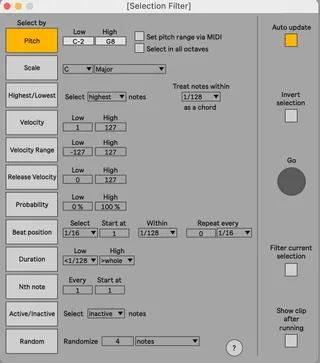
Selection Filter
NOTE: This device is fully compatible with Live 11.1 or high...
- Type
- MIDI Effect
- Author
- dennisdesantis
- Version
- 22.0.4
- License
- None
- Live version
- 12
- Max version
- 8.6
- Downloads
- 0
- Updated
- No Updates
Selection Filter is a MIDI Effect for Ableton Live by dennisdesantis, distributed as freeware, with no license specified by the author. It targets Live 12 and Max 8.6. Published 2024-02-27. 12 user comments below.
New to Max for Live? Read what MIDI Effects do, how device licenses work, how to install a device.
Description
NOTE: This device is fully compatible with Live 11.1 or higher, but it will not work in versions of Live 11 prior to 11.1. If you need to use these versions of Live, please use Selection Filter 1.0.2 instead (https://maxforlive.com/library/device/5911/selection-filter).
version 2.0.4
- improved visibility with Live themes
---
Select notes in clips based on their musical properties.
Selection Filter allows notes to be selected according to twelve types of musical criteria (nine types in Live 10):
Pitch — select all notes within a range of pitches
Scale — select all notes that are members of the chosen scale
Highest/Lowest — select the highest (or lowest) note of every chord
Velocity — select all notes within a range of velocities
Velocity Range - select all notes within a range of values of the Velocity Range parameter (Live 11.1+ only)
Release Velocity - select all notes within a range of release velocities (Live 11.1+ only)
Probability - select all notes with a range of probabilities (Live 11.1+ only)
Beat position — select notes that begin at a particular rhythmic location within a bar, and then optionally at multiples of that position
Duration — select notes within a range of note lengths
Nth note — select every Nth note, with an optional offset
Active/Inactive — select all notes that are unmuted (or muted)
Random— randomly select a fixed number or a percentage of notes
Comments (12)
To clarify - you're talking about using the Duration filter, right?
I can't reproduce this problem. For me, Duration is correctly selecting notes within the Low/High range in Live 12.
One thing - it's sometimes a bit hard to *see* which notes are selected in Live 12. Is it possible this is the issue?
Otherwise, please feel free to send me a video of the issue, or detailed steps to reproduce the bug, or even a Set. You can mail me at [email protected].
Thanks,
Dennis
Thanks
I was hoping this would let me highlight notes in the midi roll when using microtonal scales. Or instead have similar functions for the "find and select notes" function in clip view (when using a tuning file).
Maybe I'm missing something, but I don't see a way to accomplish that. For example, I want to highlight the 7 natural notes in 19-edo. (ie, C-D-E-F-G-A-B). And then have those notes highlighted across all octaves. When you are in the default 12-edo tuning, the 'black keys' are darkened slightly in the midi roll. My headache is that this disappears when using tuning files. "Find and Select Notes" would be a compromise, but this is disabled for alternate tunings afaik.
Maybe I could edit the parameter objects in the m4l device to adapt the device to 19-edo? I'm a complete Max4Live noob, I only know how to do basic midi processing. Lmk if there's some hacky way to edit this device to achieve this.
Thanks. And I will be happy to leave a nice tip on gumroad if you can lend any help. :)
But there is a problem - there is huge CPU overload in activity monitor while it's on the track. When I delete it, everything is fine.
The device doesn't currently support pitch selection when using tuning files. It *might* appear to work when using tunings that have exactly 12 pitch classes, but this is really just luck. Internally, the device has no knowledge of tunings or scales at all. It's just comparing MIDI note numbers to indices in a list of known scales.
Making this work for tunings might be possible but I haven't looked into this yet.
Best,
Dennis
I can't reproduce this. CPU usage seems to be extremely low on my machine.
Can you provide more detail - what type of computer, OS, etc.? Even better - can you send me a video demonstrating the issue?
Thanks,
Dennis