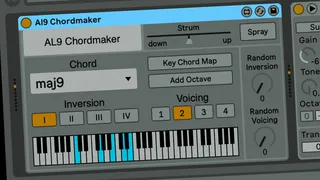
AL9 Chordmaker
The AL9 Chordmaker is a MIDI chord generator that makes it e...
- Type
- MIDI Effect
- Author
- alchemical9
- Version
- 1.2
- License
- AttributionNonCommercialNoDerivatives
- Live version
- 11.3.22
- Max version
- 8.6.0
- Downloads
- 431
- Updated
- 2024-04-19
AL9 Chordmaker is a MIDI Effect for Ableton Live by alchemical9, distributed as Creative Commons Attribution-NonCommercial-NoDerivatives. It targets Live 11.3.22 and Max 8.6.0. On maxforlive.com it has 431 downloads. First published 2024-03-20, last updated 2024-04-19. 18 user comments below.
New to Max for Live? Read what MIDI Effects do, what the AttributionNonCommercialNoDerivatives license means, how to install a device.
Description
The AL9 Chordmaker is a MIDI chord generator that makes it easy to add chords to your music. I've been using chord generators a lot in my generative music, but all the free ones have some shortcoming or didn't quite do the thing I needed. Many of them don't work well for generative music...but this one is designed for that.
Walkthrough video: https://youtu.be/6NFklbKGSMY
At its most basic, it will generate the selected chord on an incoming MIDI note, with that note as the root of the chord.
You can determine the inversion and voicing of the chord. Inversion determines which note of the chord is at the bottom. Voicing here controls the "openness" of the chord, so as the voicing value increases the span across the keyboard that the chord uses is widened.
If you can't decide which inversion or voicing to use, just dial in some random, there's a randomness control for each.
Pretty basic so far, but we have more features!
There is an "Add Octave" button that will add the bottom note an octave up. This nicely adds some top to the chord.
We also have a "Strum" control that will add a strum to the chord, either up or down, with a variable time for the strum. Strum also has a "Spray" button to randomly mix up the order of the strummed notes. Great for, you know, guitar-like sounds, but wait till you try it on some horns!
But the real breakthrough feature of this plugin is the Key Chord Map. What this does is assign a chord to each note so that instead of all the notes playing the same chord, you can determine which chord each note will play. Those of you with some knowledge of music theory will appreciate this because a scale can also be played as a series of chords, but not all the same chord, each degree of the scale has a chord that fits into the key.
This map also has a root note setting, so you can set up the note map in the key you're using or use the same map in a different key.
This feature lets your static chord generator bust out of it's confines and become way more interesting and musical.
Adding Your Own Chords
It is possible to edit the plugin and add your own chords to the devuce. This needs to happen in the Max patch editor, take a look at this video which explains how this can be done: https://youtu.be/4rE8XHDV8_s
"AL9" stands for Alchemical 9, which is my artist name, head over to my Bandcamp page if you want to hear some of my music.
Version 1.1 fixes a couple of bugs:
* chordmap not initializing
* strum scrambled with voicings 2-4
Version 1.2 fixes some bugs:
* dropped notes when using strum
* "Add Octave" and "Spray" didn't look right in automation
Version 1.3 adds another chord voice so that extended chords like 11ths can be fully voiced.
Version 1.4 makes it easier to add custom chords.
Take a look at this video, it shows you how to add custom chords: https://youtu.be/4rE8XHDV8_s
Comments (18)
Will you put a video demo to see what it looks like?
Wish I could assign a chord with any root note to any key e.g. C D E F G A B would trigger Cm, C, F#7, Dm, A, Asus etc. Or trigger those same chords with with C, C#, D, D# etc.
This way I could program in a song and play it with one finger. Custom voicings to match the original songwriter voicing would be good too.
It is possible to add your own custom chords, this video I just posted explains how. You will need to be using the 1.4 (or later) version of the device for this.
https://youtu.be/4rE8XHDV8_s
The voicings are generated algorithmically, there are just WAY too many possibilities there to do it on a per-chord basis. The downside is that it doesn't work that well for extended chords and tends to make them more dissonant. I should probably work on that.
I am getting an odd behavior when in Chord Map mode, switching from one note to another. The first note I play using a different triggering note will play just that ONE new note (one time), then play the chord. I hope that makes sense.
I'm not running into this problem, and I'm not sure what would cause this, although it sounds like the device isn't switching in the new set of notes fast enough. I'd like to see if we can fix this.
After some more testing in Chord Map mode:
Same on various instruments. I’m getting consistent behavior, every time, but only when:
Using inversions 2 or 3.
If one of the chords being triggered is set to “none”.
A little clarification on the behavior:
I play four consecutive (triggering) notes on C3, then four consecutive notes on D3.
In the Chord Map, C is set to “none”, and D is set to “maj” (or any chord).
The first time I play my D trigger (note 5 of 8) it plays only one pitch, D4. Then the rest of the three notes play the inverted chord.
Please let me know if I can make this clearer, I’m not sure how to explain this. Thanks for your interest in fixing this.
So now I'll just float this idea by you.
Currently I cannot get the new inversion until I release my note and play a new one. It would be nice if we could change the inversion setting while holding the trigger note.
Chordial MIDI 1.0 does this. https://maxforlive.com/library/device/5840/chordial-midi
The way this device works, the chord is generated when a note is played, a different chord can't happen until another note is played.
How Chordial accomplishes this, I have no idea. I'm not a builder of these magic devices.