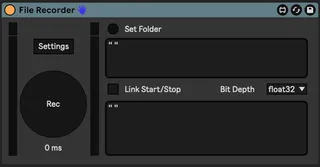
File Recorder
Records a file with the incoming audio to a specified folder...
- Type
- Audio Effect
- Author
- roygbiv
- Version
- 1.1
- License
- AttributionShareAlike
- Live version
- 12.1
- Max version
- 8.6.4
- Downloads
- 380
- Updated
- 2024-08-13
File Recorder is an Audio Effect for Ableton Live by roygbiv, distributed as Creative Commons Attribution-ShareAlike. It targets Live 12.1 and Max 8.6.4. On maxforlive.com it has 380 downloads. First published 2024-06-26, last updated 2024-08-13. 6 user comments below.
New to Max for Live? Read what Audio Effects do, what the AttributionShareAlike license means, how to install a device.
Description
Records a file with the incoming audio to a specified folder/location.
How to:
-Load the device in a track you want to record
-Set a folder for destination:
-*If the Set was never saved, a pop up windows will ask to set a folder
-*If the Set is already saved, the project folder will be utilised for the recordings
-Hit Rec
-Remember to Stop it (it will go on until your computer runs out of space and it does not care for minimum space settings)
-Alternatively one can toggle the Link Start/Stop to transport function, a file will be recorded with every Start/Stop of the Global Transport
-The file will be named [Track_Name/Main]+[Timestamp].wav so no duplicates
Particularly helpful if one wants to record a live set, while actually using the recording function in Session view so that can record new Clips without stopping the one recording the performance or avoiding to constantly overdub (Global Record). Also good to catch the tails of delays/reverbs and or simply being able to Start/Stop the Transport without stopping the recording.
Comments (6)
I hit record, run audio through it and hit stop, but nothing is saved.
@mhj That would be easy to do but I'd set it as a preference as my main way to use it is to freely start/stop transport without stopping the recording. I'll update the device as soon as I have some time. Thanks for the feedback!
@mhj The device now has a Link Start/Stop toggle to link the recording to the transport ✌️
I've been looking for a way to move Ableton while it's in Link mode, similar to how MIDI Sync works in MIDI Clock mode, but I haven't found anything. I was wondering if, since you know programming, it would be possible to create a sync in samples or milliseconds. Thanks