- Type
- Audio Effect
- Author
- eXpressivo
- Version
- 1.0
- License
- None
- Live version
- 12.3.0
- Max version
- 8.6.2
- Downloads
- 317
- Updated
- 2026-01-08
CHAOS LFO is an Audio Effect for Ableton Live by eXpressivo, distributed as freeware, with no license specified by the author. It targets Live 12.3.0 and Max 8.6.2. On maxforlive.com it has 317 downloads. Published 2026-01-08.
New to Max for Live? Read what Audio Effects do, how device licenses work, how to install a device.
Description
Chaos LFO is a modulation device based on chaotic attractor systems instead of traditional waveforms.
It generates organic, non-repeating modulation across three independent axes (X, Y, Z), allowing parameters to evolve in subtle or extreme ways.
With free-running or tempo-synced rates and multiple attractor types, it’s designed for creating living, unpredictable movement that never loops the same way twice.
Chaos LFO – User Manual
Overview
Chaos LFO is a modulation device based on chaotic attractor systems rather than traditional waveforms.
Instead of repeating cycles, the modulation evolves continuously, creating organic, non-looping motion.
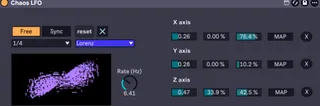
The visual display represents the trajectory of the attractor in phase space, giving real-time feedback of how the modulation behaves.
Rate & Transport Controls
Rate Modes
FREE
The LFO runs freely using an internal oscillator.
Rate is set via the Rate (Hz) knob
Maximum frequency: 20 Hz
Ideal for organic, unsynced modulation and evolving motion
SYNC
The LFO rate is locked to Ableton Live’s tempo.
Selectable divisions from 1/16 to 1/2
Best for rhythmic and tempo-related modulation
Global Controls
X (Device On/Off)
Enables or disables the entire device.
Reset
Resets the attractor state and modulation values to their starting position.
Useful for restarting motion or re-aligning modulation with musical phrasing.
Attractor Selector
You can choose between three chaotic systems, each producing a distinct modulation character:
Lorenz
Chaotic but stable, butterfly-like motion
Produces lively, expressive modulation
Great for leads, basses, and expressive movement
Rössler
Slower, more continuous trajectories
Creates long-form evolving modulation
Ideal for pads, drones, and ambient textures
Aizawa
Small-range, subtle motion
Produces very fine modulation changes
Best for micro-variation, timbral detail, and “felt but not heard” movement
Visual Display
The display shows a 2D projection of the attractor:
X-axis and Y-axis are visible
Z-axis is active but not visualized
The drawn path represents the current state of the chaotic system.
Denser or faster movement indicates higher modulation activity.
Axis Controls & Mapping
Each attractor has three axes: X, Y, and Z.
Each axis acts as an independent modulation source.
Axis Value (Left Number)
The left numeric value (e.g. 0.26, 0.28, 0.47) represents the current raw output of the attractor for that axis.
This value continuously changes as the system evolves.
Modulation Depth (%)
Each axis includes two percentage values:
Left % → Minimum modulation offset
Right % → Maximum modulation depth
Together, these define the modulation range sent to the mapped parameter.
This allows you to:
Offset modulation away from zero
Create asymmetric modulation ranges
Keep modulation subtle or extreme
MAP Button
Each axis can be mapped to one parameter in Ableton Live.
Mapping workflow:
Click MAP on an axis (X, Y, or Z)
Click a parameter in Live
The axis now modulates that parameter
Each axis supports one mapping only by default.
Additional mappings can be added by editing the device in Max for Live.
Axis Enable (X Button)
The X button next to each axis disables that axis’ modulation without removing the mapping.
This allows quick comparison and modulation toggling during performance or sound design.
Note
This is my first ever max4life device so it is far from perfect.
On the off-chance it isn't working, you might be missing the files: scaling.txt and devision_mult.txt
these contain:
scaling.txt
0, -20. 20. -30. 30. 0. 50.;
1, -15. 15. -15. 15. 0. 30.;
2, -2. 2. -2. 2. -1. 2.;
devision_mult.txt
0, 1.; 1, 2.; 2, 4.; 3, 8.;
if you have any idea how i can incorporate this feature better please contact me as I am still learning.
Support
For further instructions, questions, or feedback, contact: