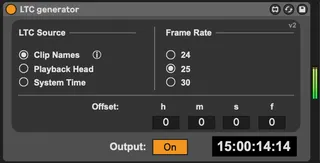
LTC Generator
This Max for Live device generates Linear Timecode (LTC) in ...
- Type
- Instrument
- Author
- jensp
- Version
- 2.0
- License
- AttributionNonCommercialShareAlike
- Live version
- 11.3.35
- Max version
- 8.6.5
- Downloads
- 351
- Updated
- 2026-01-25
LTC Generator is an Instrument for Ableton Live by jensp, distributed as Creative Commons Attribution-NonCommercial-ShareAlike. It targets Live 11.3.35 and Max 8.6.5. On maxforlive.com it has 351 downloads. First published 2026-01-21, last updated 2026-01-25. 2 user comments below.
New to Max for Live? Read what Instruments do, what the AttributionNonCommercialShareAlike license means, how to install a device.
Description
This Max for Live device generates Linear Timecode (LTC) in real time inside Ableton Live, without the need for bulky pre-recorded LTC audio files.
The generated timecode can be driven by:
- Clips whose names specify timecode markers (for example: 2m15s, 5h, 15h25m30s15f)
- The position of Live’s playback head
- The system clock
In modes 1 and 2, the device jams the timecode when playback starts and automatically retriggers whenever a jump in the timeline is detected. This guarantees a continuous and reliable LTC signal, even when looping or moving around in the Arrangement View.
Important notes:
- Because of Live API limitations, the device assumes a constant tempo while playing. BPM automation during playback is not supported.
- For best results, set your audio buffer size between 32 and 128 samples.
- Only non-drop-frame (NDF) frame rates are currently supported (29.97 fps is not yet available).
Comments (2)
As a fail safe, wouldn’t you want to have it conform to the Live TimeLine, at least when SMPTE is selected? Or at least hiccup with a red light or something, if they don’t match?
I could see why you’d want them independent, particularly if you were doing a pulldown or a telecine process, but I think this could weave a very tangled web if folks didn’t know that their sample rates and timeline didn’t match up