Chord Articulator
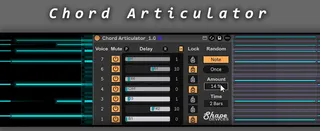
Chord Articulator is a Max for Live MIDI device that splits ...
- Type
- MIDI Effect
- Author
- ShapeDevices
- Version
- 1.0
- License
- AttributionNonCommercialShareAlike
- Live version
- 12.2.7
- Max version
- 9.08
- Downloads
- 0
- Updated
- 2026-05-25
Chord Articulator is a MIDI Effect for Ableton Live by ShapeDevices, distributed as Creative Commons Attribution-NonCommercial-ShareAlike. It targets Live 12.2.7 and Max 9.08. Published 2026-05-25.
New to Max for Live? Read what MIDI Effects do, what the AttributionNonCommercialShareAlike license means, how to install a device.
Description
Chord Articulator is a Max for Live MIDI device that splits incoming chords into independent voices.
Notes are dynamically distributed across up to 7 slots, allowing each voice to receive its own delay timing, mute state, and rhythmic placement.
Create anything from subtle strumming patterns and rhythmic chord movement to arpeggio-like sequences and simple melodic lines generated from chords.
Voice Muting
Each voice can be muted independently.
This enables more advanced routing setups, for example inside Ableton Instrument Racks, where separate instruments can receive individual voice lanes.
Individual Delay Timing
Each voice can use its own tempo-synced delay amount.
A global multiplier can be used to scale all slot delay timings together.
Randomize Delay Timing
Delay values can either be adjusted manually or randomized automatically, either once (“Once”) or regenerated for every incoming chord (“Note”).
The Amount control determines the strength of the generated timing variation, allowing anything from subtle rhythmic movement to more unpredictable rhythmic structures.
Each slot can be individually locked to exclude it from randomization. This makes it possible to keep selected rhythmic voices stable while other slots continue generating new delay variations.
Panic Function
Emergency “all notes off” reset across all channels and pitches.
(Included for safety, though I’ve never personally needed to use it.)
Compatibility
Ableton Live 10, 11, and 12
No external libraries required.
Typical Use Cases
melodic phrase generation from chords
multi-instrument chord routing
generative MIDI processing and accompaniment creation
live performance workflows
experimental sequencing setups