- Type
- Audio Effect
- Author
- Bert
- Version
- 1.3
- License
- None
- Live version
- 9.0.4
- Max version
- 6.1.2
- Downloads
- 886
- Updated
- 2013-09-07
multi-stage-clips is an Audio Effect for Ableton Live by Bert, distributed as freeware, with no license specified by the author. It targets Live 9.0.4 and Max 6.1.2. On maxforlive.com it has 886 downloads. First published 2013-08-12, last updated 2013-09-07. 5 user comments below.
New to Max for Live? Read what Audio Effects do, how device licenses work, how to install a device.
Description
+++ATTENTION+++
There's now V.2.0 of this device in the library (http://www.maxforlive.com/library/device/1902/multi-stage-clips).
But since it utilizes a very different workflow, I decided to upload both. Each of them may suit your needs better, depending on the circumstances.
+++ATTENTION+++
In my live-set I was looking for a way to launch multiple clips in a row with the same button on a midi-controller.
Here's a set of two m4l devices which allow you to do that:
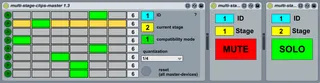
- Put the clips you want to launch sequently on individual tracks (midi or audio) - on THE SAME scene. Put all these tracks into one group! You can put several sequences of clips one below the other in scenes.
- Put one "multi-stage-clips-slave" device on each track and set the stage (yellow box) for every track individually. This defines the order in which the clips are played.
- Put a "multi-stage-clips-master" on any track you like within the project. One master-device is able to control up to 8 sequences of staged clips. You can use several master-devices to control more than 8 sets. If you want to control more than 8 sequences within one group of tracks, you should give all the slave-devices and master-devices of this group the same ID (blue box). If you want to control two sets of 8 seqences on two seperate group-tracks (e.g. to play two sequences at a time) - just give each set its own ID.
- In the master-device you can define how many stages each sequence has (default = 6).
- Assign your preferred midi-controller-button to launch all clips of a sequence simultaneously (playbutton of the group-track).
- Assigne THE SAME midi-controller-button to the play-button in the master-device. Use the play-button underneath the column which represents the desired sequence and has the right amount of stages.
Now each time, you press the assigned midi-controller-button all the clips of the sequence (the clips on one scene in the group) are triggered. But the slave-devices allows only one track to play and mutes the rest. The next time you press the button, the next track gets soloed... and so on.
CHANGELOG:
1.3
- matrix is now horizontal for more intuitive workflow. yellow bar indicates the set of clips, which is currently playing.
- the timing of the clip-launch-quantization is now selectable
- 2 compatibility modes: MODE 1 for midi-controllers, that also send note-off messages (like switches or keys), MODE 2 for midi controllers, that don't. Try which one's working best for you!
Thanks to the Ableton User Group Hamburg for their feedback!
1.2
- added clip-launch-quantization (pink button). Enables switching of stages quantized on the first beat of each bar.
For feedback and suggestions: [email protected]
addendum:
- Try putting the clips in "Legato-Mode" (clip-launch-settings). It may suit your taste better.
- I use these devices with an Icon i-Stage controller. To get visual feedback I have to assign the buttons to dummy-clips. It may be the same with other controllers (such as the novation launchpad), but I hadn't have the chance to try it.
- You can reset the master-devices with the reset-button. If you press the button on one device all devices in the project are reset!
Comments (5)
Ableton 9.0.1
max 6.1
Hope there is a fix. Thx!
MB
Did you set up the device as described above?
What do you try to use it for? Eventually Version 2.0 (http://www.maxforlive.com/library/device/1902/multi-stage-clips) might be easier to set up...
I don,t know if is possible with your max device that i am looking for.
Excuse my english
Please tell me if is possible:
In Ableton we can launch scenes.Each scene launchs the clips that are in the same row.
I want for example launch one clip (the third clip of the track 3) and when i launch it will sound together with it the second clip of the track 2 and the first clip of the track 1.
If is possible to create scenes with clips that are in different row.To create different scenes for each clip,for example if i launch the 5th clip of the second track will sound together this and the 3th of the third track and the 4th of the first track.
Is possible this with your device or do you know how to get this?
Thanks ;)
Long story short, what this accomplished is making any grid controller, let's say a launchpad (in note mode, with a grid of buttons midi-mapped to trigger the aforementioned grid of clips) serve the purpose of being a seamless (and I mean SEAMLESS, no break in audio whatsoever) switch between the sends in a track, granted you have a performance setup where you have a considerable amount of returns that you want to be able to, at the touch of a button, jump between sends without, again, a break in the audio.
Since you're controller's columns are mapped to the columns of clips (which each represent a "dominant" switch for a send on the track that column is controlling), you have visual feedback of what send your track is running through.
The code works as follows, lets take a column of clips controlling sends A,B,C,D on track 1.
Launching clip A (corresponding to send A, which in my case is my dry through, and we'll call S-A) executes ClyphX code that all at once switches S-A from 0-127, S-B from 0 - 0, S-C from 0 - 0, S-D from 0 - 0.
Launching clip B switches S-A from 0 - 0, S-B from 0-127, S-C from 0 - 0, S-D from 0 - 0...
...and so on, clip C sends A-0, B-0, C-127, D-0, yadda-yadda.
My workaround before was midi mapping a controller I made in MIDItouch, only because it let you send multiple CC's from one control, which got directly MIDI-mapped to the sends. It WAS a seamless transition (though very rarely a small, but audible click), but even tethered through USB using MyWi, there was sometimes latency issues from the controller.
Again, this is instantaneous, and given you don't have eight tracks and eight effect returns, you have pads left over on your controller for the signal path routing within those returns. Ha, now that I've gone and explained it anyway, I guess email me if you want the text file template I made of code (enough for one column of I think 6 sends) that allows you to just do a find and replace of a character (I think I chose X) in the whole document, so you can just repeat for each track that is going to have it's sends mapped to a grid-controller. Let me know, man.