- Type
- Instrument
- Author
- robTech
- Version
- 22.3
- License
- None
- Live version
- 9.1.4
- Max version
- 6.1.6
- Downloads
- 14,927
- Updated
- 2014-09-20
noisedrone is an Instrument for Ableton Live by robTech, distributed as freeware, with no license specified by the author. It targets Live 9.1.4 and Max 6.1.6. On maxforlive.com it has 14,927 downloads. First published 2014-08-07, last updated 2014-09-20. 14 user comments below.
New to Max for Live? Read what Instruments do, how device licenses work, how to install a device.
Description
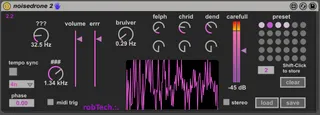
noisedrone 2 is a quite awesome noise machine; based on the work of dorkattack (http://www.maxforlive.com/library/device/292/noisedrone) - thanks for it!
I added some enhancements:
- some odd circuitry (felph, chrid, dend; don't ask what they do, just try it)
- optional trigger by MIDI
- pseudo-stereo-option
- a cool scope :-)
- some nice colors
- 5 seconds fade-in on loading the device for security reasons ;-)
...unbelievable what you can get out of 3 sinewaves and some math...
CAUTION: this device can produce sudden VERY high volume peaks, so keep volume VERY LOW in the beginning; keep care on your spekers and your ears!!
Comments welcome;
...let's make some noise!
Update 2014-09-15:
-----------------------------------
- softened the initial preset - for protecting ears and speakers when plugging in the device
Update 2014-09-08:
-----------------------------------
- added a tempo sync; I found the ### parameter produces rhythmical structures at low frequencies; with the tempo sync button and timing setting you can get the beast inteo the beat :-)
"phase" sets the off-beat percentage.
- Added a preset system; now you can store/recall settings within a live set
- added a DC filter in the Output (which occured sometimes before)
Update 2014-08-13:
-----------------------------------
Download contains a bunch of presets now; therefore provided as a ZIP file.
Comments (14)
Rob
thanks for the device; can't seem to access the presets. I put the entire noisedrone2 folder in userlibrary/presets/instruments/maxinstrument. if i try to load from the device and navigate to the presets they are blanked out.also trying to hotswap removes the device completely and gives an error message. thanks for your help
perhaps you got confused between the device presets (included in the zip file) and the preset system of the device (right section of the device) - same expression for two different things, sorry; let me explain the difference:
The provided presets of the zip file can be loaded by double-clicking one of the files with the extension .adv; these can be seen within Live's browser (under categories navigate to presets/instruments/maxinstrument, open the branch under noisedrone 2, here you see the preset files. double-clicking brings it into the selected track. If the device is already loaded, drag the .adv file to the title bar of the device, then you here the new preset.
The preset system of the device (bubbles area on the right side) is a different thing: here, you can store various parameter settings within one instance of the device by Shift-click one of the bubbles and restore one by single-click the bubble (or automating the preset number) - so you can switch immediately between various sounds. Load and save buttons here save the complete set of 30 parameter sets, but this has nothing to with the .adv preset files (therefore you haven't seen the presets in the load dialog, as the file extension is different).
I hope I could clarify it and you can enjoy the crazy sounds of this things now ;-)
Cheers, Rob
perhaps you got confused between the device presets (included in the zip file) and the preset system of the device (right section of the device) - same expression for two different things, sorry; let me explain the difference:
The provided presets of the zip file can be loaded by double-clicking one of the files with the extension .adv; these can be seen within Live's browser (under categories navigate to presets/instruments/maxinstrument, open the branch under noisedrone 2, here you see the preset files. double-clicking brings it into the selected track. If the device is already loaded, drag the .adv file to the title bar of the device, then you here the new preset.
The preset system of the device (bubbles area on the right side) is a different thing: here, you can store various parameter settings within one instance of the device by Shift-click one of the bubbles and restore one by single-click the bubble (or automating the preset number) - so you can switch immediately between various sounds. Load and save buttons here save the complete set of 30 parameter sets, but this has nothing to with the .adv preset files (therefore you haven't seen the presets in the load dialog, as the file extension is different).
I hope I could clarify it and you can enjoy the crazy sounds of this things now ;-)
Cheers, Rob
I took the device and preset folder out of the orig folder and it works ok now; one thing; each preset is seriously overloading the output; even if I reduce the output gain to -70db, its nearly clipping. thanks
the overloading is somehow part of this device; it's for making NOISE (in the real sense and also in the sense of the genre) and in my opinion experimenting with the area far above 0 dB is not uninteresting. Put some other FX behind it (the crazier the better, you find alot here) and listen what happens ;-) But thanks for mentioning!
btw: far over 3000 downloads in the meantime; what are you doing with this thing, guys???
Cheers Rob