- Type
- MIDI Effect
- Author
- SirenAudio
- Version
- 1.0
- License
- AttributionNonCommercialShareAlike
- Live version
- 9.1.8
- Max version
- 6.1.10
- Downloads
- 3,630
- Updated
- 2015-04-24
SA.Puck is a MIDI Effect for Ableton Live by SirenAudio, distributed as Creative Commons Attribution-NonCommercial-ShareAlike. It targets Live 9.1.8 and Max 6.1.10. On maxforlive.com it has 3,630 downloads. First published 2015-04-20, last updated 2015-04-24. 14 user comments below.
New to Max for Live? Read what MIDI Effects do, what the AttributionNonCommercialShareAlike license means, how to install a device.
Description
Please see this video for a demonstration of the device:
https://www.youtube.com/watch?v=m-ARM9y3Xmw
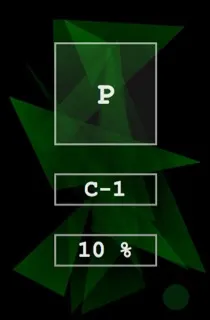
Puck is a Max MIDI Device that allows you to use one note to output multiple notes that are currently being played on the device's track. The basic idea behind the device is to be able to play chords using one note.
The first parameter is the Trigger Note. This allows you to select the note that is used to trigger currently held notes. By default this is set to C-1. This is quite a low note that you're unlikely to use when playing or creating chords. The 'P' square will be highlighted green when the trigger note is being held.
The second parameter Velocity Percent, which allows you to specify how much the Trigger Note's velocity will affect the output notes. When set to 0%, Puck outputs the velocities of the held notes, and at 100% the notes will be scaled to a range of 0 to 1.5 times the original note's velocity.
There's also a small green button in the bottom right hand corner which will send note off messages for any stuck notes. In practice I haven't found there to be any problems with stuck notes, however it's possible to turn the device off in between a note on and note off message which may cause this.
The device uses the [mxj] object, so if you don't have Java installed it will not work.
Comments (14)
Would be nice if the trigger note is saved within the project (I guess its a hidden parameter). Furthermore Pitch- & Modwheel data does not come through.
Unfortunately it crashes Max 7.3.0 (or is it just me?), any idea to fix it or planing any update?
Cheers
This plugin is great, but this one little glitch makes it tough to use right now.
Would love to see an update. Thanks for the great device @SirenAudio
This plugin is great, but this one little glitch makes it tough to use right now.
Would love to see an update. Thanks for the great device @SirenAudio
Little different than the youtube video shows, but still a good tip nonethe less!