MIDI Router and Receiver - XS
This is a small 16 track MIDI utility device which allows yo...
- Type
- MIDI Effect
- Author
- TBTAHG
- Version
- 1.0
- License
- AttributionNonCommercialShareAlike
- Live version
- 9.1.6
- Max version
- 6.1.6
- Downloads
- 1,924
- Updated
- 2015-11-06
MIDI Router and Receiver - XS is a MIDI Effect for Ableton Live by TBTAHG, distributed as Creative Commons Attribution-NonCommercial-ShareAlike. It targets Live 9.1.6 and Max 6.1.6. On maxforlive.com it has 1,924 downloads. First published 2015-05-16, last updated 2015-11-06. 6 user comments below.
New to Max for Live? Read what MIDI Effects do, what the AttributionNonCommercialShareAlike license means, how to install a device.
Description
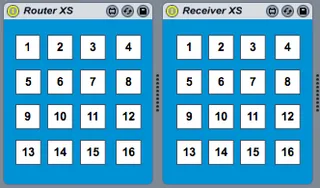
This is a small 16 track MIDI utility device which allows you to connect MIDI input devices to MIDI instruments, giving you the possibility to change routings on the fly without having your Live set freezing for a few seconds or losing sync with external hardware and other problems like that.
It is basically a miniature version of this device here (-> http://www.maxforlive.com/library/device/3003/live-midi-router-and-receiver ), designed to save some precious screen-estate in comparison with the original device.
How to use this device:
- Create a dedicated MIDI channel for each controller (set it's 'MIDI From' to the controller in question, set 'MIDI To' to 'No output' + arm the track) + drop an instance of the 'MIDI_Router' device on it
- Create as much instrument tracks as you need (set the 'MIDI From' to 'No Input') + drop an instance of the 'MIDI_Receiver' device on every single one of them.
- You are now able to assign a MIDI controller to an instrument by making a one-on-one connection between a router and a receiver by selecting the same track number on both the router and receiver. (In this version of the device, there is an upper limit of either 16 tracks or 16 MIDI controllers to be used at once.)
P.S.: As the device actually consists of two devices (Router and Receiver), the download is a .zip-file, just containing the two .amxd- files.
Comments (6)
http://www.maxforlive.com/library/device/3626/zero-latency-midi-router-sender
That one seems to be more of a general router, while this one is specific to MIDI controllers. Is that correct?
In order to fix it, I have to first, connect the audio device and select it, and then restart ableton. Once Ableton loads again, all my preselected channels show up on both the router and receiver devices.
Anybody knows what could be causing this behavior? It is annoying because when I move from home to church to perform I always have to do this to connect the new hardware and get all my midi routings configuration back.