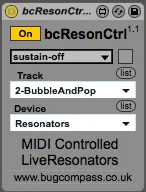
bcResonCtrl
A Max For Live device that converts MIDI note on / off ...
- Type
- Instrument
- Author
- bugcompass
- Version
- 1.1
- License
- AttributionNonCommercialShareAlike
- Live version
- 9
- Max version
- 6
- Downloads
- 4
- Updated
- 2022-09-20
bcResonCtrl is an Instrument for Ableton Live by bugcompass, distributed as Creative Commons Attribution-NonCommercial-ShareAlike. It targets Live 9 and Max 6. On maxforlive.com it has 4 downloads. First published 2015-07-06, last updated 2022-09-20. 13 user comments below.
New to Max for Live? Read what Instruments do, what the AttributionNonCommercialShareAlike license means, how to install a device.
Description
A Max For Live device that converts MIDI
note on / off messages from an external
keyboard or internal MIDI clip into
control parameters for Ableton Live's
built in Resonators effect.
Instructions
------------
1) Place the device on the MIDI track
that contains the source of the MIDI
you want to use to trigger the effect.
2) Select the specific instance of the
Resonators device you want to control
using the display's menu.
3) sustain-off works as version 1.0.
The number of keys pressed turns on and
off the individual resonators.
sustain-on ignores the number of keys
pressed, so once an individual resonator
is open, it will stay open until the menu
is returned to sustain-off.
fully-open immediately turns on all
resonators until the menu is returned to
sustain-off.
4) Sustain pedal on / off (cc#64) will
affect the sustain menu. You can invert
the pedal polarity with the button.
Note: Again, the range of Live's
Resonators is limited, so notes lower
than C-2 and higher than C5 will cause
them being output as C-2 and C5
respectively. Given the pitches concerned
are fairly extreme under normal
circumstances this should not be a
problem, however if requested by users,
this will be corrected in the next update
to them being ignored entirely.
Updated in this version
-----------------------
1) Added a sustain menu to filter out
note off messages.
2) Included external sustain pedal
control.
Older versions
--------------
http://www.bugcompass.co.uk/bcResonCtrl1.0.zip
Copyright
---------
You may used this device freely in your
audio production work.
You may use or adapt the contained
Max/MSP patch for use in your own patches
for personal use only.
Redistribution of any patches containing
all or part of this patch is permitted
for non-profit purposes only, as long as
the original author is credited and the
original patch and this file are included
each time.
Use of this patch in any form for
commercial use or profit is not allowed,
without the original author's written
permission.
____________________
www.bugcompass.co.uk
Comments (13)
thanks for sharing!
*0 sample impact on latency compensation and very stable
*had to pile on instances before I saw any CPU increase
*exceptionally wide range of creative possibilities and routings
*responsiveness. enough for melodic lines, not just harmonic structure.
I've found ways to accommodate the device in many routing scenarios however I do have some considerations:
Does this need to be an instrument device? Could it be midi? I've found myself creating parallel chains on instrument tracks in order to drop it in, whereas I already have no-output midi tracks setup for other utilities or midi-thru.
Also, the note off messages are turning the speakers off of the resonators, right? If this is on a return, for example, at 100% wet that would completely mute the signal. I like the result for playing it like an instrument.
Alternatively, I can see the use of keeping the resonator open, but just changing the sonorities. I've worked this by grouping the resonator and assigning the resonator speakers to a knob with a range of 127 min/ 127 max. Again, I can see the potential of having the speakers off with the note off message, so a sustain toggle (or alternatively a foot pedal momentary assignment?) might be nice.
No, I don't miss having the full MIDI note range, thank you for asking. In fact, I bet it keeps us out of trouble-no continuous rumbling or screeching. I think you'd end up engaging the cut-off filter out of necessity.
Thank you SO much for posting this!
But the option of not disengaging the resonator speakers with a note-off message might still be a good alternative for continuing signal through the resonator...
Thanks for your feedback. I have taken on board the previous sustain limitations.
Based on what you’ve described, the issue is most likely related to the recent update to Max 9. This update introduced changes that can affect how certain Max for Live devices function, especially those with specific scripting or parameter routing.
It seems that the bcresonators device may need to be updated by its developer in order to be fully compatible with the new version.
Reverting to a previous Max version, as you've done, is a practical workaround for now. To avoid this happening again, keeping automatic updates disabled in both Live and Max is a good precaution.
In response to your questions:
Fixing the issue with M4L scripting
Without access to the internals of the device, it's difficult to offer a concrete fix. If you’re comfortable editing the patch, it may be worth checking how it interacts with Live’s API. For example, whether it's relying on object IDs or paths that might behave differently in Max 9. Sharing this information with the device developer might also help move things forward.
About a MIDI-controllable version of Resonators
We appreciate your feedback. Independent MIDI control over each resonator voice is something we've seen interest in from other users as well. While we can’t make any promises, future versions of Live may offer more flexibility in this area.
Alternatively, you could revert max to the latest Max 8.6.5 version and use this an editor in Live:
https://downloads.cdn.cycling74.com/max8/Max865_241008.dmg
Here is how to set this:
Using a separate Max for Live installation
Please note though that this might bring risks with newer Max devices that were developed for Max 9. So the best approach would be to get the resonator device updated by their devs.
Let us know if anything else comes up, or if you'd like help rolling back or freezing your current Max version more permanently.
All the best,
Marcus