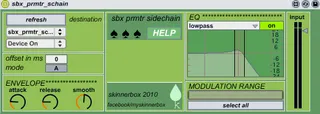
sbx parameter sidechain
takes incoming audio and use it to modulate any given parame...
- Type
- Audio Effect
- Author
- skinnerbox
- Version
- 1.0
- License
- AttributionNonCommercial
- Live version
- 8.1.3
- Max version
- 6.1.9
- Downloads
- 4,913
- Updated
- 2015-03-18
sbx parameter sidechain is an Audio Effect for Ableton Live by skinnerbox, distributed as Creative Commons Attribution-NonCommercial. It targets Live 8.1.3 and Max 6.1.9. On maxforlive.com it has 4,913 downloads. First published 2010-06-07, last updated 2015-03-18. 5 user comments below.
New to Max for Live? Read what Audio Effects do, what the AttributionNonCommercial license means, how to install a device.
Description
takes incoming audio and use it to modulate any given parameter of any device or plugin in live. has cool features like envelope, offset, eq and such. press help for further info....
demo video:
http://www.youtube.com/watch?v=d2EBhKlGx1g
Comments (5)
thank you
I have the following problems (using Live 9):
- target effects can be selected in the drop-down list, but no parameters are showing up on any of them in the menu below.
- the "Q" value in the filter can not be changed.
So I haven't been able to modulate anything with this.
Hopefully an easy fix. Looks promising.
Thank you.
Given this, you'll be able to select a device (I am using Live 9, also). After spending time looking at the patch, it seems that basically all you'd need to do to get this working properly (aside from using the method in the above to find the proper device id for live.remote~) is to get the min and max value of the selected parameter, and set the scale to these values.
Perhaps somebody with better Max skills can do this. I don't expect it to take too long after this - I just could not figure out at all how to properly get the min and max values for a parameter, though I would have expected this to be an easy API call.