- Type
- Audio Effect
- Author
- ShelLuser
- Version
- 1.5
- License
- None
- Live version
- 9.5
- Max version
- 7.0.6
- Downloads
- 383
- Updated
- 2015-11-03
RecClipColor is an Audio Effect for Ableton Live by ShelLuser, distributed as freeware, with no license specified by the author. It targets Live 9.5 and Max 7.0.6. On maxforlive.com it has 383 downloads. First published 2015-11-02, last updated 2015-11-03. 7 user comments below.
New to Max for Live? Read what Audio Effects do, how device licenses work, how to install a device.
Description
In Live 9.5 the tracks automatically get a random color (this can be turned off) while all the new clips in session view get assigned with the same color as the track they're on.
For me this is a horrendous change and a total deal breaker. I /need/ diversity in my test scores, I also /need/ the people who jam with me to be able to tell me what clip color I should play while testing / playing. While they can look on my screen they can't read the clip names.
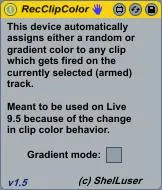
This device automatically assigns a random color to any clip which gets fired on an armed track so that we get the previous random color behavior back.
Update 1.5:
I now added a "gradient" option which will instruct the device to assign a color which is darker than the clip above the one you're recording in, thus creating a bit of a color difference. It seems Live's color palette doesn't really allow for this, but it's a solid start.
Comments (7)