- Type
- Audio Effect
- Author
- ctignor
- Version
- 2.0
- License
- AttributionShareAlike
- Live version
- 10.11.6
- Max version
- 7.3.6
- Downloads
- 3
- Updated
- 2019-08-04
Trigger Finger is an Audio Effect for Ableton Live by ctignor, distributed as Creative Commons Attribution-ShareAlike. It targets Live 10.11.6 and Max 7.3.6. On maxforlive.com it has 3 downloads. First published 2016-02-15, last updated 2019-08-04. 13 user comments below.
New to Max for Live? Read what Audio Effects do, what the AttributionShareAlike license means, how to install a device.
Description
Now for 64-bit!
Full docs at:
http://www.wiresundertension.com/soft/doc/TriggerFinger/TriggerFinger-UsersGuide.pdf
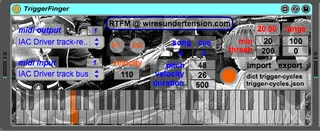
Play your favorite synth or sampler by kicking a drum, plucking a string, or creating any other decidedly percussive acoustic racket. The louder you play, the louder your synth plays. As for what note it plays, pick one manually or better yet, provide your own set of pitches for it to cycle through with every hit. That’s right, composition meets electronic music you actually play with acoustic instruments.
Comments (13)
Also my instrument didn't have velocity response which in some situations you want a "dumb" velocity--always the same velocity.
Does this have responsive velocity only?
All great questions!
Answers below and check out http://www.wiresundertension.com/soft/doc/TriggerFinger/TriggerFinger-UsersGuide.pdf
for this info and more too.
"How many notes can your "coll" fit?"
I don't know of any upper bound on this. The amount of memory is trivial so unless coll itself has some arbitrary constraints I'd be surprised there'd be any practical ceiling here. I've personally used > 100 pitches myself.
That said, in practice, it's almost always more practical to keep these cycles smaller and more manageable. This is why the device supports breaking songs into different "cue" sections. That way you can organize your songs into more manageable cycles. From a live performance standpoint (the purpose of my devices) what if you get "off" by one while performing one of these cycles? Better that you're not off for the entire work and just a smaller section. Organization is key.
"in some situations you want a "dumb" velocity--always the same velocity"
So true.Too much velocity sensitivity can be super annoying. This device allows you to choose a range that maps input level to the 0-127 velocity range. You could use this to effectively pin the velocity to 127, then use M4L's built in velocity device to scale this to whatever you like. Note, you could use this second step for your instrument too - just use a "fixed" velocity in the utility provided with Live and send your notes to it.
I agree it would be good to add direct support for just fixing the velocity w/o going through these steps. Great though for the next version - thanks!
Anyways thanks for this.
A common problem is setting up the virutal MIDI buffer.
Feel free to write me at ct [at] wiresundertension.com with some screen shots and I can try and get you there.
Thanks again! (also I find the music you make incredibly awesome and inspiring)
Thanks again! (also I find the music you make incredibly awesome and inspiring)
Once the device is outputting MIDI it's easy to map these messages in Live to whatever you want using Live's great MIDI-mapping capability.
Make sure, as per the Users Guide, you have your virtual MIDI bus that TriggerFinger is sending to set-up to receive on "Remote" Input (The guide also specifies "Track" Input for sending midi for playing instruments on other tracks).
Then, simply MIDI map the clip you want to play to the note you want to use. This is most easily done using some other MIDI device (e.g. a keyboard). More on MIDI-mapping Live in the "Manual Mapping" section here:
https://help.ableton.com/hc/en-us/articles/209069249-Getting-Started-3-Setting-Up-Your-MIDI-Controller
Then when TriggerFinger triggers a MIDI note on the channel corresponding to the note/channel you MIDI mapped your clip to, it will trigger it just like any other MIDI event would.
One further thing: I'm not sure if Live supports toggle on/off capability for triggering clips via MIDI. You might be better off putting your sound into a Drum Rack at a specific note and then using TriggerFinger to simply send notes to this track through the virtual MIDI bus as described in the Users Guide.
Made it work on with Ableton 9.7 32bit.
But.... I loaded the same project using Ableton 10 64bit and It did not work.
I'm on OSX 10.11.6 (El captain) using a mac Intel from 2009.
Please, could you tell me if it should work the same with Ableton 10 ?
I opened the device using Max4Live and I noticed that the midi output and input names were not the same as in Live 9. I mean Live 9 prints a list using the default virtual midi bus (IAC Driver Bus IAC 1) whereas in Live 10 it prints "IAC Driver track-remote bus" and "IAC Driver track bus".
I RTFM but could not find a tip relating to my problem.
Any advice?
Thx a lot
my fault.
Could you tell me if it should be complicated to make it work with 64bits? I'm a developer and I could give a try if you don't mind.
Let me know
I'm afraid I'm having a little trouble getting this working using TriggerFinger64 with Live 9.7.7 64-bit & Maxforlive 7.3.4.
I'm sure the virtual MIDI part is working as I can play the midi channel using the trigger button on plugin. The problem seems to be it doesn't recognise any audio going in as the red number is set on 0. There is definitely audio present as I can see the output signal level moving on the track volume display.
Any ideas?
Thanks for trying this out.
Hard to tell from the post what might be up. Might be easier if we do a walkthrough together.
email at ct [at] wiresundertension.com and include any screenshots of your setup?
Thanks!
Thank you so much for getting back. I hope I'm doing something silly as this TriggerFinger is exactly what I've been looking for.
I have just got to work so I won't be able to email until a bit later tonight, thanks again.