- Type
- MIDI Effect
- Author
- emajcher
- Version
- 1.1
- License
- AttributionNonCommercialShareAlike
- Live version
- 8.2.1
- Max version
- 5.1.6
- Downloads
- 8,066
- Updated
- 2011-01-13
Device LFO is a MIDI Effect for Ableton Live by emajcher, distributed as Creative Commons Attribution-NonCommercial-ShareAlike. It targets Live 8.2.1 and Max 5.1.6. On maxforlive.com it has 8,066 downloads. First published 2010-07-20, last updated 2011-01-13. 17 user comments below.
New to Max for Live? Read what MIDI Effects do, what the AttributionNonCommercialShareAlike license means, how to install a device.
Description
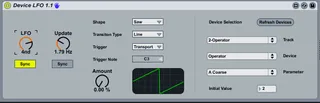
A m4l midi effect plugin that can be used to modulate any instrument, midi effect or audio effects parameters. The LFO rate can be sync'd to the transport clock or can be set to run freely based on it's frequency. Since the LFO is driven by a signal there is also an update rate on how often to sample the LFO for a new value that will be applied to the device parameter. The value will be scaled based on the parameter's min/max value and a percentage of that value, based on the amount setting will be added to the parameter initial value (the updated value is always based on the initial value, not the current value). The LFO will be start/stopped with the transport and the parameter will be reset to it's initial value.
The transition from value to value can also be set to either jump from point to point (Line) or sweep (Ramp) based on the frequency of the update rate.
Additionally, the selected track, device and parameter will be saved with the live set and restored again when the set is reloaded.
note ... I purposely made this device very simple as far as functionality is concerned. I prefer small, specific devices since I treat Live as a modular production environment, much like max/msp. I found the LFO to have no noticeable impact on the CPU, so any number of LFO's should be able to be added to to your Live set for all kinds of crazy modulations. You can even have LFO's modulating the frequency's of other LFO instances.
I found best results in having a slow LFO rate with a medium to fast update rate using the ramp transition type for crazy parameter sweeps.
Any ideas on enhancements (or bugs) are welcomed.
** Updated to version 1.1 with added ability to trigger the LFO with notes or the transport. You can set it to any note (every note will re-trigger the envelope) or a specific note if you want to control the LFO more closel.
Comments (17)
I was planning on posting a documented version of the of that module since I assumed it would be useful to other people. It will probably be another week since I am taking a Jitter class this week.
In retrigger mode note on's coming in on the same track will restart the LFO
1: It doesn't remember what it was supposed to control after I close the set.
2: It taxes my computer enormously, like 10% per instance(~one year old macbook pro).
Any chance for fix?
Regarding 10% CPU ... again, I am surprised, can you tell me what plugin you are controlling, I am not seeing any taxing of the CPU even if I max out all of the settings. I do have a 1 year old macbook pro, but I have 8gb of memory, I wonder if that is hiding any performance issues.
I will surely take a look this weekend and post an update.
However reloading issue is real.
See you
Kind regards
http://forum.ableton.com/viewtopic.php?f=1&t=158999
I will download the beta and verify ... work has been a little crazy this week otherwise I would have been on top of this sooner.
I must admit i am scared a bit to use betas but i'll try and i'll give you report on this here.
Btw i see that from yesterday there is even newer beta of Ableton (8.2.2b4) so i'll install that and latest Max available from link in that thread. http://forum.ableton.com/viewtopic.php?f=1&t=159960
Thanks again.
Have a nice day.
exactly that i was looking for!