1stStep Monophonic 8-Step Sequencer
UPDATED TO v0.2!! *************** 1stStep has been...
- Type
- MIDI Effect
- Author
- moroccodave
- Version
- 0.2
- License
- Attribution
- Live version
- 9.2.3
- Max version
- 6.1.7
- Downloads
- 2,480
- Updated
- 2016-07-30
1stStep Monophonic 8-Step Sequencer is a MIDI Effect for Ableton Live by moroccodave, distributed as Creative Commons Attribution. It targets Live 9.2.3 and Max 6.1.7. On maxforlive.com it has 2,480 downloads. First published 2016-07-16, last updated 2016-07-30. 5 user comments below.
New to Max for Live? Read what MIDI Effects do, what the Attribution license means, how to install a device.
Description
UPDATED TO v0.2!!
***************
1stStep has been updated with some new features!
This demo track was made with this device:
https://soundcloud.com/dave-field/noodles-for-breakfast
Release Notes:
-----------------
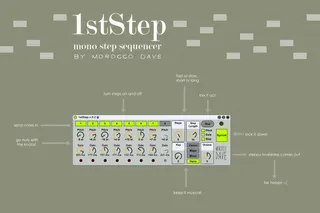
1. Randomiser feature added. On click, the RND button will randomise step pitch, gate and on/off, depending on whcih options are chosen with the 3 toggles below the RND button. Produces some surprising rhythmic and melodic sequences, great for generating new ideas.
2. Sequencer Mode - Free/Synced. In FREE mode, the sequencer will repeat the specified number of steps regardless of the underlying position in the bar. In SYNCED mode, the sequencer will always align beat 1 of the sequence with step 1 of the sequence.
3. Info area text added for all controls.
4. Automation parameter names improved and rationalised throughout.
Please give feedback, I'm happy to incorporate new ideas into this effect.
v0.1 Description
************
This is my first attempt at creating an M4L device.
1stStep is a simple monophonic, 8-step sequencer. I've aimed it at being performance-friendly (I set out to create a sequencer I can use with my modular synth in performances) so everything is visible in the interface in one go. LEDs give visual feedback as to where you are in the sequence. In keeping with using this for live performance there are quite few controls and parameters. I've used it with the faders and knobs on my master keyboard mapped to the device - works a charm, and feels very analogue (which is exactly what I was after).
I'm sure there are better ways of achieving what I've done here so feel free to offer constructive criticism.
For the scale and key controls I've borrowed from the work of atomictag (http://www.maxforlive.com/profile/user/atomictag) whos MIDI note scale translator 1.1 (http://www.maxforlive.com/library/device/3193/midi-note-scale-translator) had a really nice, clear implementation that I've taken as the base code for my controls.
I'll put some audio of this device in action up on SoundCloud at some point soon.
So...
Download.
Stick this device on a MIDI track.
Plug in a keyboard or set up some notes on a clip as input.
Put your favourite synth device after the sequencer.
Map a controller for extra fun.
Make sure your transport's running (this bit's important)
And...
Go nuts with the knobs!
Comments (5)
Please consider adding Randomize function for Steps and Gate!
Some randomisation is already on my "to-do" list for this device, along with swing variation and a means of re-locking to beat one (although I really like that you can get really out of line with your start-of-bar my messing with the step count, it'd be nice to have a quick way of getting back again)
Glad you're enjoying it, please check back for updates every so often!
Dave
There is a plenty of sequencers out there already, but your device is really easy and fun to play with!) Thank you!)
So much fun now with randomise function!)
Do you have any plans about Slide function?)