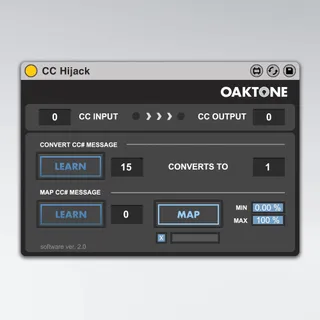
CC Hijack
Have you ever noticed that when you midi map a control chang...
- Type
- MIDI Effect
- Author
- jeffcaylor
- Version
- 1.5
- License
- Commercial
- Live version
- 11.0.1
- Max version
- 8.1
- Downloads
- 3
- Updated
- 2021-03-24
CC Hijack is a MIDI Effect for Ableton Live by jeffcaylor, distributed as a commercial (paid) device. It targets Live 11.0.1 and Max 8.1. On maxforlive.com it has 3 downloads. First published 2017-04-07, last updated 2021-03-24. 5 user comments below.
New to Max for Live? Read what MIDI Effects do, what the Commercial license means, how to install a device.
Description
Have you ever noticed that when you midi map a control change message in Ableton Live, you lose that functionality in other instruments? FOR INSTANCE, I’ve always wanted to assign my sustain pedal to the hold button in the Arpeggiator midi device. Unfortunately, if you do that in Ableton Live now, you disable the sustain pedal everywhere else. This device lets you sustain notes as normal, but it also allows the sustain pedal to be mapped to a button, like Arpeggiator Hold.
Available for $9 usd at
https://www.oaktone.com/products/cc-hijack
Please note, I’m providing these details at maxforlive.com as an FYI to the community of folks here who like interesting add-ons for Ableton Live. If you have any issues, please use the form on my web site since I rarely visit this page and likely won’t see your comments.
The other trick the CC Hijack device does is it can take any incoming control change message and assign it a new number. This is useful if you have a midi controller that doesn’t allow you to change CC#’s on your knobs and sliders.
Version History:
1.1 - Fixed bug where CC Convert defeats other CC output. Cleaned up code.
1.2 - Updated interface and cleaned up code.
1.5 - Rebranded and updated interface at Oaktone.com
Comments (5)
Otherwise I´ll just test it asap.
Some parts of the device are not visible in Live 10....