Zoom G5 CC to Bank and Patch
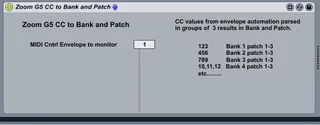
Inspired by "CC to Program Change", this device will activ...
- Type
- MIDI Effect
- Author
- maxhack
- Version
- 1.0
- License
- None
- Live version
- 9.6.2
- Max version
- 7.2.4
- Downloads
- 285
- Updated
- No Updates
Zoom G5 CC to Bank and Patch is a MIDI Effect for Ableton Live by maxhack, distributed as freeware, with no license specified by the author. It targets Live 9.6.2 and Max 7.2.4. On maxforlive.com it has 285 downloads. Published 2017-07-31. 1 user comment below.
New to Max for Live? Read what MIDI Effects do, how device licenses work, how to install a device.
Description
Inspired by "CC to Program Change", this device will activate a bank (LSB) and patch number (Program Change). I have only used this on my Zoom G5 multi effects, but may work with other hardware that organizes presets in banks of 3. It will take in the number passed in from the envelope, divide by 3 to get the bank, and use the remainder to select the patch. I suppose it could be edited to divide by a number other than 3 if your hardware uses a different number of patches per bank. Perhaps I should make that configurable in the UI ;-).
Comments:
IMO this is a pretty clunky method for adding program changes to your timeline (mainly for the reasons listed below), I wish there was a more elegant plugin for doing this.
Tips and Gotchas:
1. There seems to be at least 2 positions for each break point value in the envelope view. Meaning if you have a break point set at a value of 45, the next break point may have a value of 45 as well, but will actually be at a different position. Holding down the control key while moving the break point up or down (Fine Tuning) will allow you to see this. This means the line between the two breakpoints isn't actually straight, even though they have the same value. This will result in interference in the sound coming from the G5. So, the answer is to create the break point once, since it will default to the correct position, and don't move it. If you have to move it, you're better of starting over.
2. When creating break points, zoom in to the max, to make sure the vertical line is straight up and down, this will make for a smoother patch change with no interference.
3. Patches close together in number ie. 45 to 46 will basically be two dots sitting on top of each other. I wish there was a way to zoom in along that horizontal axis. You can, to some degree by maximizing the envelope window, but they will still be pretty close together. You may want to organize your patches so they are spaced apart a little more, though this will prevent you from being able to switch between them manually in a live situation.
Comments (1)