- Type
- MIDI Effect
- Author
- Razzkazz
- Version
- 1.9
- License
- AttributionShareAlike
- Live version
- 11.2.5
- Max version
- 8.5
- Downloads
- 3,544
- Updated
- 2022-11-07
Repetitor is a MIDI Effect for Ableton Live by Razzkazz, distributed as Creative Commons Attribution-ShareAlike. It targets Live 11.2.5 and Max 8.5. On maxforlive.com it has 3,544 downloads. First published 2018-04-20, last updated 2022-11-07. 19 user comments below.
New to Max for Live? Read what MIDI Effects do, what the AttributionShareAlike license means, how to install a device.
Description
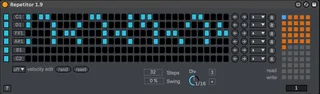
Repetitor is a 4-channel gate generator inspired by the Zularic Repetitor by Noise Engineering. The patterns it uses are taken from the manual of the Zularic Repetitor.
If you wish to support further development you can make a donation by purchasing my music on my Bandcamp. Albums are listed as "name your price".
Updates
Version 1.5
Added velocity control for each channel - includes controls for random and reset.
Version 1.6
Now also fully compatible with Live version 9
Version 1.7
Fixed
Number of step now works for all channels.
Read and write button now work more consistently
Interface adjustments
Updates (requests)
Added 2 additional lanes/channels.
Active number of steps now displayed for each channel
Trigger note selection is automatable and mappable
Preset selection is automatable and mappable
Version 1.8
Added button to turn on/off each sequencer lane. Removed "active steps" number readout.
Version 1.9
Added a randomize button "R" for each sequence.
Added a direction menu for each sequence.
Comments (19)
just one guestion.
Is it possible to ad velocity per step?
but it looks interesting
Thx.
Great device. Can you add more Channels?
I just have one suggestion..is is possible to add a count of number of active steps in each sequence, e.g. to the right of the left and right arrow buttons?
I'm asking as I often use the zularic for melody generation, e.g. combining it with a turing machine, and there I set how long my sequence needs to be.
So, if the C1 sequence has, say, 5 active hits in a 16 hit sequence, then I can easily know to set my Turing sequence to 5 or 10, etc.
The counting of steps takes a bit of time, as you have to switch from making music to counting, which throws me off.
This count for each sequences could be done in a very subtle way (small font, grey colur) - just something that would indicate the value.
Many thanks and hope you'll consider the addition.
Regarding saving presets, if I modify the device, delete it then CMD/CTRL+Z the device restores correctly. If you delete the device then reload it from the browser your settings will be lost, this happens with any device. You need to save (write) your settings before deleting the device. You would also do this if you wanted to use settings from one session in another. Am I answering the question correctly or do you mean something else?
I need to move the read/write buttons slightly lower as sometimes when you click on them they don't launch correctly, in that you have to select slightly lower on the button.
Thanks for taking up on the offer to add the readout.
So, in terms of saving presets...I wanted to also use Zularic as a bank of patterns of sorts. I have many beat patterns/midi patterns, that are in individual MIDI clips (I use them to generate drums). I was thinking of just inputting these patterns into Zularic and saving them as a device. So that in a different session, project, etc, I can just load up Zularic and my customs patterns would be there.
So Zularic would become a device that can store any patterns for future use.
I'm just not sure if the device or Max allows for saving presets as you would with commercial plugins (say you create a preset ofr Massive, save it, then start a new project, load up Massive, and the preset is still there). The patterns would probably be need to be written to some table/file/storage.etc. Hope this makes sense.
So, I use Zularic not just for drums but as a rhytmic foundation of creating a melody (by randomizing the note pitch of say C1 sequence you get get some interesting melodies). I usually just need one of the sequences running in that case, e.g. the C1 sequence. So I need to insert a MIDI funnel plugin after Zularic to ignore all the other notes. Wondering if the four Zularic sequences can be turned off/on individually if needed. If that's not hard to code, that'd be a massive help.
Feel bad about making all of these requests mate, but you're doing great work and that often spurs more work. Thanks.
P.S. If you find the time to switch the sequences on/off (e.g. by clicking on the Note scales on the left), that'd be the cheery on top. Amazing work!
Added a randomize button "R" for each sequence.
Added a direction menu for each sequence.