- Type
- MIDI Effect
- Author
- greaterthanzero
- Version
- 1.1
- License
- None
- Live version
- 10.1.7
- Max version
- 8.1.2
- Downloads
- 192
- Updated
- 2020-02-26
SWAM Thing is a MIDI Effect for Ableton Live by greaterthanzero, distributed as freeware, with no license specified by the author. It targets Live 10.1.7 and Max 8.1.2. On maxforlive.com it has 192 downloads. First published 2019-09-02, last updated 2020-02-26. 5 user comments below.
New to Max for Live? Read what MIDI Effects do, how device licenses work, how to install a device.
Description
-- Now w/ SWAM Brass support! --
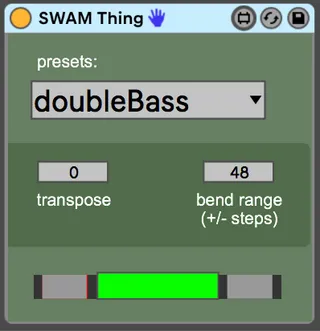
This device extends the pitch range of AudioModeling SWAM instruments. I don't expect it will be useful for any other synth.
All of the AudioModeling SWAM instruments have notes you can bend to, outside the range of notes you can start on. I guess they're used for effect, but aren't something a human player would ever reach for.
This device detects when you're trying to play those notes, and rearranges things so that you can. (It applies pitch bend to a note you're allowed to play, instead of triggering a note that would be silent)
The math is different for each of those instruments, but a simple drop-down will let you select yours as needed. An editor is also provided, in case my settings are not to your liking.
v1.01 FEATURE REDACTION:
Unfortunately, is seems max for live only saves these settings with your live set. To store them between sessions, we have to change them while the .amxd file is open in your editor, and then save the device before closing it. I'm not removing the preset editor, but I am removing access to it from the front panel. Sorry.
v1.02 correction - froze the device to include an external I didn't realize was. (see comments below)
v1.1 addition - SWAM Brass instruments added.
Note, several of the new brass instruments can technically extend lower than I allowed, but I cut things off at what I deemed the edges of musicality.
(when I could no longer discern enough difference between the low frequency pulses that sort of pass for notes, that seemed like a good place to not play lower than.)
---
Note: This device more or less assumes that your synth is configured to a bend range of +/- 48 steps. If this is not the case, use the "bend range" setting to match yours. (That *should* work, but I honestly haven't tested it.)
Comments (5)
Unfortunately, this site isn't great about sending notifications (special thanks to Dan Derks for emailing me personally!), so this has gone unaddressed for three or four months now, and none of you will likely ever know that i'm correcting the situation.
(New upload momentarily. I'll update the version number to 1.02, I guess)
I've been up all night setting ranges for all the new SWAM Brass instruments. Double-checked them all, but let me know if there are problems.
I may decide to reorganize the drop-down menu, and possibly split things up by family. (e.g., a secondary dropdown to select between woodwinds/strings/saxes/brass) It's getting cluttered.