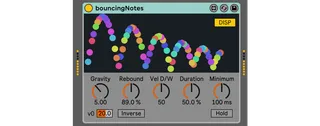
bouncing notes
*** This is not an official device. If you were looking for ...
- Type
- MIDI Effect
- Author
- h1data
- Version
- 1.2.2
- License
- AttributionShareAlike
- Live version
- 9.7.7
- Max version
- 7.3.5
- Downloads
- 5,815
- Updated
- 2025-05-02
bouncing notes is a MIDI Effect for Ableton Live by h1data, distributed as Creative Commons Attribution-ShareAlike. It targets Live 9.7.7 and Max 7.3.5. On maxforlive.com it has 5,815 downloads. First published 2020-03-21, last updated 2025-05-02. 25 user comments below.
New to Max for Live? Read what MIDI Effects do, what the AttributionShareAlike license means, how to install a device.
Description
*** This is not an official device. If you were looking for that, ***
*** please visit https://www.ableton.com/packs/ ***
While note on, generates repeating notes like bouncing table-tennis ball
with dynamic display animation.
Simulates bounces from the levitation-ish on the Moon to fierce conditions of 60G.
Available in polyphonic and inverse mode!
Changes in version 1.2.1 (August 27, 2023)
- Fixed an issue when no parameter was shown in Push. In this change, lower versions of Max may show a warning but the device works.
Changes in version 1.2.2 (August 31, 2023)
- Changed the bank name in Push to 'Main', following built-in devices.
Check URL for more descriptions.
Comments (25)
Unlike MIDI's hold (CC#64), you must keep notes on to continue bouncing.
With HOLD on, the device keeps bouncing after bouncing time has reached Minimum knob's time.
With HOLD off, bouncing ends when the time has reached Minimum.
I am considering to add this to the description or change "Hold" label.
Or should be to add MIDI-like hold function?
HOLD's default value is off intentionally and I checked again that
the button state is saved in Live sets and it functions like above.
In Live 10, may the button seem to disable (grey color) or unable to click?
I thank again for your feedback and sorry for my poor English..
Windows Ableton 10.1.13b1 (beta)
Max 8.1.3
Device works well and animates very nicely (compared to JBouncingBall 0.1 by frosty) .
I wish there was another mode that creates the triggers just on note on.
another suggestion:
Maybe Velocity drop off could be 0-200%
thanks again for device, sorry for spam!
I can't make quick reply because I am not native for English.
It is very pleasure to get many responses, anyway.
Now I understood the device's display problem in Max 8.
Because "Label Text Color" property/message was added in Max 8, the problem is not fixable including Max 6/7 environment.
I decided to forget label display mode of live.text objects and change to default display mode.
The velocity Dry/Wet calculation may also have a problem and be considered to find a solution.
So sorry for inconveniences. The fix update will come soon.
> another mode that creates the triggers just on note on
I have been considering that, but I decided to stop bouncing with note off
to avoid the risk that the device produces uncontrollable numberless notes.
I keep to consider true MIDI-ish hold function.
> Maybe Velocity drop off could be 0-200%
I have been considering to implement as "inversed bouncing" mode for a future update.
("Inv" button is hidden in the patch and automation list, as you saw)
It seems more intuitive that bouncing becomes inversed at Rebound parameter exceeds 100%. I am considering that method.
> JBouncingBall 0.1 by frosty
I searched the device library once but I couldn't find a similar device.
(once the device name was "bounce echo" and I searched for "bounce" or "ping pong")
Bouncing Ball 1.0 by aminoplacid seems predecessor of frosty's.
I guess the devices are another approach but might be informative.
Thanks again for the information!
> mappable controls
It seems a higher charenge for me because I never tried live.object/live.path, but I wish I could develop as an another device.
It is very pleasure that this device contributes someone's creativity!
Because I still don't own Live 10/Max8,
would you please inform if this update fixed the display problem in Max 8?
Thank you for your feedback.
@AYA, thanks again for your comment!
After read M4L production guidelines (which were updated in 2020, by the way) ,
I realized several issues in my previous devices.
I would like to deal with those for a while.
I still have some other ideas which are not formed properly yet, but I wish I could make it happen someday!
I just uploaded the device which changes live.text's display mode and includes minor refine.
@Hacktive, ¡Gracias por el comentario! Espero que este perrito rifado te haga disfrutar.
(sorry for a reply completely relied on Google translate, but stay safe folks!)
It is my pleasure to share stuffs which solves my own demands.
And hope someone use it for unexpected way!
@Syn Thank you for making a comment for my devices! I like little devices too.
Is there a way to set the total duration of the playback? For example, if I want to clamp/restrict bouncing notes to end after 4 bars? Right now in Ableton Live, I'm mainly doing some guessing and then using warping afterwards to constrain the length.
It would be great for transition effects and ramping up intensity if the total length could be specified.
Also, is there a way to reverse the direction, so that it starts out bouncing very quickly but then gets slower?
I am sorry but there is no way to change note duration except changing 'Minimum' knob or releasing the original note.
I had never considered limiting note duration by elapsed time.
There might be several ways to implement it, so I would like to share images somehow.
Reverse or inverse mode is the most required feature, I understand.
Perhaps I will update after Live 11 released...?
(I have to research or recreate my past patches..)
Sorry, but I cannot reproduce the situation with my 10yo PC.
Could you tell me the version number that works fine?
Further information like captured video is welcomed.
It would depends on the minimum bounce time
and the refresh rate aka FPS of your monitor display.
Try Phase Pattern if you want to generate bouncing sequences in a fixed duration.
https://www.ableton.com/packs/midi-tools/
I experience momentary freezes on macOS Ableton when I have HOLD on and Minimum = 1.00 ms in an arrangement where a lot is going on with other MIDI tracks, but maybe that's "expected" due to the sheer note density?
Yes, but it depends on the instruments after this effect and the load of your CPU.
Please let me know if recorded MIDI tracks do not cause freezes in the same setup.
Because this has no bouncing limit like the official bouncy one,
you should freeze your track to audio when there are too many loads.
P.S. When the MIDI Tools were introduced, I thought it was time to finish the homework from you.
However, I was not focused enough to accomplish it before Phase Pattern arrived...