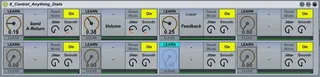
8 Control Anything Dials
This patch is the result of additions and modifications to t...
- Type
- Audio Effect
- Author
- Rezo220
- Version
- 1.4
- License
- AttributionNonCommercialShareAlike
- Live version
- 8.2.2
- Max version
- 5.1.8
- Downloads
- 1,608
- Updated
- 2011-04-15
8 Control Anything Dials is an Audio Effect for Ableton Live by Rezo220, distributed as Creative Commons Attribution-NonCommercial-ShareAlike. It targets Live 8.2.2 and Max 5.1.8. On maxforlive.com it has 1,608 downloads. Published 2011-04-15. 9 user comments below.
New to Max for Live? Read what Audio Effects do, what the AttributionNonCommercialShareAlike license means, how to install a device.
Description
This patch is the result of additions and modifications to the "Max Api AMap1" which comes with Live.
The idea being that you could feed automated data from your own devices to the dials via Max (which will require some patching on your behalf).
You can map the dials to any fader, dial or control function box inside Ableton.
You can apply an automatic jitter function to the control and smooth/delay it if necessary.
Simple and easy to use interface.
These dials work like an expanded version of the Macro dials.
I hope you find it useful, it can be changed to your own uses if needed. The Bpatchers are contained with in the parent patch.
Any suggestions for improvements or if you have problems, let me know.
Thanks
**UPDATE** Just added an inlet to the Bpatchers to enable floating point data to be passed to the control dials from anything you hook up.
Unlock the patch for details....
Comments (9)
Will give you a day to fix it otherwise I'm going to delete 3 of them.
Deleted all but the one with the screenshot - (jpg files didn't seem to work, only png).
With regard to it not working for you - are you running the latest versions of Max and Live?
The knobs can be mapped to any audio/midi effect unit/instrument or any of the mixer controls (volumes/sends etc).
And about controlling seg.BPM - I don't think the controls of Live's sample settings can be mapped because they are not included as part of the API and because they are written to a file on the hardisk - I could be wrong, but I notice seg.BPM cannot be mapped via MIDI either. This is probably because in a live situation things could get too processor hungry (with all the different algorhythms that could be going on at once and writing to disk stuff) - having said that you can map the device to the global tempo!
The device can also be mapped to the Simpler or Sampler (if you have Live Suite), so you could try experimenting with that. Or build your own sampler in Max which can time-stretch samples in real time. I know there are some granular samplers out there that can achieve the effect you're looking for!
Do you have the latest versions of Max for Live, Max MSP and Ableton Live??
Just to clarify - I'm sure you've tried this, but:
click 'learn'
then move the send track fader.
The fader should then be mapped to the control dial.
If you still having trouble then check out the similar devices that come with Max for Live.
In Ableton Live browse to the following:
Audio Effects > Max Audio Effects > Tools > API
The first 4 devices there should work for you.
This patch uses some of the code from the "Max Api AMap1" device found there.
it still doesn't work but i now how to create the patch i want.
This would be incredibly useful to me, except that MIDI mapping doesn't work for the dials on your patch. In other words, I can map a dial in your patch to an arbitrary parameter, but I can't map a physical knob to the dial, which is what I really want to do. Why is that?
Regardless, thanks for the patch!