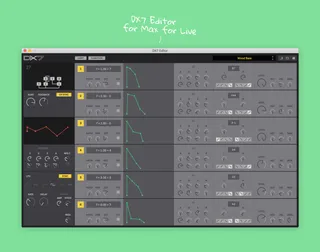
DX7 Editor
The DX7 is Yamahas first and most iconic FM synthesizer, cov...
- Type
- MIDI Effect
- Author
- detunes
- Version
- 1.0
- License
- Commercial
- Live version
- 10.0.1
- Max version
- 7.3.5
- Downloads
- 0
- Updated
- 2021-12-15
DX7 Editor is a MIDI Effect for Ableton Live by detunes, distributed as a commercial (paid) device. It targets Live 10.0.1 and Max 7.3.5. First published 2020-04-30, last updated 2021-12-15. 12 user comments below.
New to Max for Live? Read what MIDI Effects do, what the Commercial license means, how to install a device.
Description
The DX7 is Yamahas first and most iconic FM synthesizer, covering a wide sonic territory that works equally well in 80s-oriented music and modern productions. Now you can tweak this timeless classic from within Ableton and enjoy additional features like copy and paste, initialization and patch management.
Features:
- For Yamaha DX7, TX7 and compatible synths like Volca FM
- Sysex connection between your DAW and synth to read and write patches, and to tweak all parameters from the editor in realtime
- Visualization of all algorithms, waveforms and envelope shapes
- Copy and paste mode to easily sync operator settings and envelopes between several operators
- Function settings and routing for external controllers like mod wheel and foot and breath controllers
- Initialize all parameters to start from scratch
- Save and load patches as single files to and from your computer and enjoy unlimited patch storage on your hard drive
- Ultra compact view within Abletons device area
Includes editor device file, a written manual and example patches.
If you have any questions or need help just send an email to:
Hope you enjoy!
Comments (12)
Is there any way (Sysex librarian / editor) that can divide a 'bank' into seperate patches ?
maybe you guys should team up?
are there any plans for an editor for the TX816?
as you might know, there are several ways to use the 8xDX7 modules in it: same patch with slight variations OR layer different patches OR have "Composite Sounds" like here at 3:45 https://www.youtube.com/watch?v=OWO6PiGzgXc where each module please a different part of complex sounds.
it would be so great to have an editor / Randomizer for that.
Hope this feature will be added in the future.
You can simply enable automation for the parameters of your choice in Max (click the control and enable "Parameter Visibility" – then it's visible in Ableton for automation). But be careful: I have not enabled this by default and do not recommend it cause it may freeze your synth. These early FM synths were never meant to be automated and the Midi interface is super slow – even changing a single parameter too fast can cause the Midi interface to overload and throw Midi buffer errors.
Another aspect to keep in mind is this: In these FM synths the note is calculated when it is generated. Everything you do after that does not affect the existing note, only the following note. So unlike an analog synth you can not modulate decaying sounds by turning knobs or automating stuff in a DX7.
Hope that helps!
Christian
thx a lot