- Type
- MIDI Effect
- Author
- djfriendzone
- Version
- 1.1
- License
- Attribution
- Live version
- 10.1.15
- Max version
- 8.1.3
- Downloads
- 2,137
- Updated
- 2020-07-21
Uplifting Bassline is a MIDI Effect for Ableton Live by djfriendzone, distributed as Creative Commons Attribution. It targets Live 10.1.15 and Max 8.1.3. On maxforlive.com it has 2,137 downloads. First published 2020-06-29, last updated 2020-07-21. 2 user comments below.
New to Max for Live? Read what MIDI Effects do, what the Attribution license means, how to install a device.
Description
This device is inspired by Dan's "Uplift Arpeggio,"
link: https://maxforlive.com/library/device/6170/uplift-arpeggio
Intro Video: https://www.youtube.com/watch?v=4iAJBydpMHw
WHAT'S NEW IN VERSION 1.1:
* The ability to tie midi notes, which can create some nice syncopated rhythms
* Transport doesn't have to be running to get sound & tighter timing
* The ability to change the number of steps to shorten the pattern (edit the device and look for the number of steps in Live)
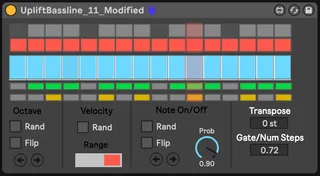
It is designed for uplifting trance or rolling basslines, including psytrance, uplifting trance, progressive, etc. In particular, hold down a single note, and the pattern will play through the note on/off, velocity, and octave controls. The octave control allows the note to be pitched up an octave, useful for those rolling basslines. Alternatively, you can simply use the first note to create psytrance style basslines. I made this device because I am switching to Live from FL and everyone knows FL's Piano Roll is better than Live's, so I wanted an easy way to sequence basslines for Uplifting Trance
The Controls:
HOW TO USE (Similar to Dan's Uplift Arpeggio)
* Write a chord progression, and copy in the bass notes into a bass sound with Uplift Bassline (I like writing a chord progression, and copying the subpad or basspad pattern)
* add the device and use the top grid to create a 1 bar long, 16th notes monophonic sequence from the given notes (the first row represents the pitch as is, while the second represents the input note an octave higher). This is basically an arpeggiator, but control over the octave pattern plus on/off control.
* Tweak velocities and select which notes are (or are not) playing using the velocity editor and the little note on/off grid.
And that's pretty much it really... The remaining controls are just the icing on the cake and allow you to:
* Generate random bassline sequences, velocities or note on/off configurations (most randomization functionality can be tweaked/constrained e.g. you can select the range of velocities, or the probability of a "note on")
* Manipulate the note sequence in different ways e.g. shifting the pattern left/right or flipping octaves vertically (please experiment with that, it's easier to play with than it is to explain!)
* Adjust the global note/gate
* Transpose the pattern up/down by semitones (useful because some patches have oscillator semitone adjustments so the whole bassline comes out octaves below or above others)
Once again, huge shoutout to Dan for his awesome arpeggio. This wouldn't have been able to work without him!
Comments (2)