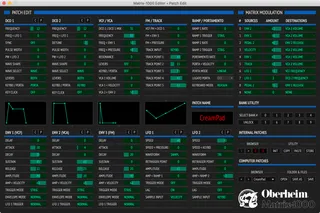
Matrix-1000 Editor
Hello and thank you for your interest in the Matrix-1000 Edi...
- Type
- MIDI Effect
- Author
- TenSquare
- Version
- 1.0.2
- License
- None
- Live version
- 12.2.5
- Max version
- 8.6.5
- Downloads
- 0
- Updated
- 2025-10-12
Matrix-1000 Editor is a MIDI Effect for Ableton Live by TenSquare, distributed as freeware, with no license specified by the author. It targets Live 12.2.5 and Max 8.6.5. First published 2020-12-21, last updated 2025-10-12. 46 user comments below.
New to Max for Live? Read what MIDI Effects do, how device licenses work, how to install a device.
Description
Hello and thank you for your interest in the Matrix-1000 Editor, a Max for Live device specially designed to program your Oberheim Matrix-1000 synthesizer.
The Matrix-1000 Editor is a very powerful, ergonomic and intuitive MIDI editor. Real software remote control tailor-made for the legendary Matrix-1000, it is used directly in the music production software Ableton Live (ableton.com).
Thanks to this Max for Live MIDI editor, you will rediscover all the sound creation potential of your Matrix-1000, and it is really huge! Indeed, although this rack synthesizer is not directly editable on the front, it contains practically the same engine of synthesis as the equally legendary Oberheim Matrix-6 and Matrix-6R !
With the Matrix-1000 Editor, you can finally access all of your Matrix-1000's settings with just a few mouse clicks. You'll be able to do so much more with advanced new features designed to make sound design easier.
Have fun ! :)
Comments (46)
seems like it finds an error loading the names of the parameters, which appear to be named all (live.comment) and no midi signal is coming out of the channel at all. not if i alter the parameters nor if i try to send a midi signal.
on the Max Console i receive these errors:
live.comment: live.comment: no such object
live.comment: live.comment: no such object
live.comment: live.comment: no such object
js: m1k.core.js: Javascript ReferenceError: ParameterInfoProvider is not defined, line 90
js: error calling function init [m1k.core.js]
the live.comment is repeated per parameter name that was missing
am i doing something wrong?
thanks in advance for your work and for sharing!
What are the versions of your Ableton Live and Max softwares ? As explained in my user manual, you need will Live 10.1.30 and Max 8.1.8 to make the device work correctly.
Someone on Facebook has encountered exactly the same issue because he was using a previous Live version, I think it works for him now.
Cheers,
Guillaume
I'm really happy that you like my MIDI editor for the Matrix 1000. :)
I hope you'll use it to create lots of new sounds and fully explore the potential of your synth, it's one hell of a machine!
Were you able to successfully operate the device in Ableton Live? Was my documentation useful to you ? What versions of Live and Max are you using?
Have fun ! ;)
All the best from France.
Guillaume
I am sorry for the late reply, I just saw your message :)
Yes it's a hell of a synth, so many parameters I am actually overwhelmed, will need some time to tame it :)
I am using Live 11 and Max 8 (last versions released for both) on Mac OSX Monterey (Apple Silicon but running Live with Rosetta). Everything is working properly (at least I couldn't find any issue).
My Matrix 1000 has the original firmware 1.11 so the feedback is relatively slow, this makes it half fun to sweep parameters.
I am waiting for the TaunTek firmware which should fix those sysex lags.
I didn't use the documentation since I am used to midi and audio routing but I quickly red it now and it seemed very clear, really kind of you to share all this hard work, and for free!
All the best from Germany! (I am French too hehe)
Elliot
The world is small ! :)
I'm really happy to know that my device works well under macOS Monterey and the latest versions of Max and Ableton Live. A good point !
I myself had started the development of the Matrix-1000 Editor via the original Oberheim EPROM v1.11. It's true that the processing of SysEx messages is a little slow... I then equipped the synth with the TaunTek EPROM, it was night and day! You should feel quite a difference when you receive yours, it's much smoother, especially on the filter movements! Thank you for your positive comment on my documentation, I took pains ;)
Have fun !
Musically,
Guillaume
thank you!
i'll let you know my feedback, i am on win 10 ableton 10
Thank you for your comment. I have made a special effort to write my user documentation, I hope it will help you to make my device work with your Matrix-1000 under Live 10 & Windows 10. Let me know when you're done :)
Have fun !
Guillaume
Merci pour cet éditeur du matrix 1000 !
Malheureusement impossible d'avoir l'affichage correct, j'ai pourtant utilisé les polices du dossier d'installation et sont bien installées dans le livre de police (mac osX)
As tu déjà eu des retours de problèmes similaire ?
Merci,
Victor
Merci, hâte de pouvoir essayer ton app !
Je suis ravi que tu aies finalement réussi à faire fonctionner mon device dans ton setup. Juste pour savoir, tu utilisais quelle version de Max précédemment ?
Amuse-toi bien, et n'hésites pas à donner ton retour d'expérience utilisateur ici ! ;)
Guillaume
- - -
Hello Victor,
I'm glad you finally got my device working in your setup. Just to know, which version of Max did you use previously ?
Have fun, and don't hesitate to give your user experience feedback here! ;)
Guillaume
Would you be motivated to make a short video to show us how you program your Oberheim Matrix-1000 with my Max for Live editor, post it on YouTube and give us the link here?
Thank you all so much for your positive feedback and encouragement!
Good kisses from France.
Guillaume
En 1ères impressions, jai été bluffé par la réactivité des filtres, dco, ADSR.
Pour les modulations cela m'a semblé un peu moins bien.
J'ai voulu m'y remettre aujourdhui, mais malheureusement pour une raison que je n'explique pas cela ne fonctionne plus.
Le device de max envoie bien de l'info midi (mon matrix 1000 réagit, les valeurs changent sur l'écran d'affichage) en revanche je n'ai aucune sortie audio du matrix. Celle ci revient bien quand j'enlève le matrix-1000 editor de ma piste. Je comprend pas pourquoi j'ai subitement ce problème.
Concernant la vidéo sur youtube je pense que c'est tjrs un plus !
cheers !
When I load the master editor, my midi interface should receive information, but it receives nothing. I know that the matrix can send info because when i set echo to ON and send midi notes, it sends the echo back.
It's neat to be able to set my patch in ableton, but that's all I can do, change from patch 000 to patch 493 or whatever, but nothing else.
Has anyone had this problem before?
Looks like SysEx messages are not getting through and only program changes are taken into account.
What version of Live and Max are you using?
What MIDI interface do you use?
Guillaume
I have the same issue, i can send program changes or edit parameters from the editor to the m1000 OK.
But the editor does not seem to receive any sysex data as described by Slorrin.
Using Ableton Suite 11.2 - Windows with a Midisport 4x4.
Editor looks awesome tho, hope i can get it to work somehow....cheers!
If i now select the patch from the editor it works fine.
Looks awesome - thanks for the great effort put in this!!!
I'm glad you finally got my Matrix-1000 Editor to work with Live 11.2 and your MIDI interface. :)
Have fun !
Guillaume
I've got it working, and it looks great thanks!
However, I am only able to change Banks, and not Programs via the Internal Patches Browser.
Do you know why this is happening, and how to solve the issue?
That's a bit strange...
Are you able to edit the Matrix parameters values ?
Can you make a test and try to send a program change to the Matrix, starting from an empty Ableton Live set and using a simple MIDI track and a MIDI clip. You can set the program change number in the Clip window, it will be sent when you launch the clip.
Let me know.
Guillaume
Just wondering if midi mapping the parameters would be possible? And also play with ableton automation on parameters. I tried to edit the device: changed every live.numbox so Parameter Visibility is set to Automated and Stored. While I can now midi map the parameters, it only affect visually the numbox and sends nothing to the ob matrix 1k. Any hints on that?
Best,
Edouard
Thank you very much for your very positive feedback, it's a pleasure! :)
The issue you're talking about is exactly why I disabled the ability to automate my editor settings in Live. This is a limitation of Max when used with JS, up to version 8.3.1 I believe. I reported this to the development team at Cycling '74, they have since fixed it. So you should be able to automate my editor settings in Live and send the corresponding SysEx commands to the Matrix-1000 provided you install Max version 8.3.2 or higher ;)
Musically,
Guillaume
What an incredible M4L device, thank you so much!
I read Edouard's points about Lane Automation; this would be a 'game changer' for me on this plug in too if it was indeed possible (I'd also probably do away with my Patch Editor hardware...). That said, I do not have the knowledge to understand which parameters to change (i.e the live.numbox parts) in M4L to make this a possibility. I've changed up to 8.5.2 within Live, for reference.
Are there any plans to update the plug to enable labnel automation. If not, would you be able to point me in the right direction to make these changes as a test?
Many thanks,
Kris
Thank you very much for your interest and your very positive feedback regarding my Matrix-1000 Editor, I really appreciate it ! :)
I'm starting to get a few requests for an update to my device so that we can automate the editor settings in Ableton Live. I promised a few people that I will try to find the time to do this update.
In principle, it's not very complicated, but I still have to redo complete tests with the Matrix-1000, in order to be certain that the device works as expected...
For the moment it's a bit complicated for me because I have just moved into my new place of life, but I will get back to developing my MIDI editor soon !
All the best from France.
Guillaume
Wishing you happiness in your new home!
Many thanks for getting back so fast and I look forward to the updates :)
Kris
Fabulous job, well done!
Many of you have asked me to implement parameter automation in Ableton Live for my Matrix-1000 Editor. After more than a year of absence in the comments of this page (and I apologize for that), here is a v1.0.1 update of my device allowing to automate the synth parameters in Live.
I was able to do some fairly conclusive quick tests but not the complete tests that I would have liked to do, because I no longer really have the time or energy to complete this project. I am counting on your cooperation to report any bugs to me. ;)
Please keep in mind that the Matrix-1000 is not very responsive to incoming SysEx messages, except for about twenty parameters optimized using the TaunTek EPROM :
http://tauntek.com/Matrix1000Firmware.htm
If you notice audio glitches when automating certain parameters in Live, this is probably normal and unfortunately I won't be able to really improve things given the response time of the machine...
Hoping that this update, long awaited by all, gives you satisfaction ! :)
All the best from France.
Guillaume
Could you tell me if there is a way to alter the parameter appearing in Push?
I would like to reorder them a little and add the filter section that is somehow missing (page 4 seem to be broken)
There usually is a live.bank object in the .amxd file but I could not locate it.
Maybe you have a tip for me so I can improve the Push parameter layout?
Thank you for this device!
Just leaving a report, current Matrix-1000 Editor seems it does not save Computer patches.
Both [SAVE AS] and [SAVE] does not create file at all, and adding .m1kp extension manually doesn't work too.
In Max Console, both actions gives back the message '[undefined] bad number'.
I'm running the editor in Live 11.3.35 with Max 8.5.8 and everything else works brilliantly.
Many thanks,
Indeed, my editor's parameters are not currently supported by Ableton Push or traditional MIDI controllers. It would be interesting to implement this, but as you've probably gathered, I don't have the time right now to dedicate myself to this project again...
Really sorry about the bug with saving patches to the computer; something must have happened with the newer versions of Live and/or Max for Live, as it worked fine before. I'll try to find a time this summer to look into it, but unfortunately, I can't promise anything.
Theoretically, my editor should be able to work with the original Matrix-1000 EPROM, but I highly recommend using a modified Tauntek EPROM, as the synth is much more responsive to incoming SysEx messages with this version!
All the best from France !
Guillaume
Thank you very much for your very positive feedback about my Matrix-1000 Editor. :)
I must say I'm very surprised by the behavior of my device in your setup. It's still strange that it mutes your Matrix-1000, since the device only sends SysEx messages to the synth.
I know my device hasn't been working as well as it used to since the Max 9 update (especially in terms of file management), but I'm having trouble understanding why it would mute your Matrix audio output...
Does your synth have a Tauntek EPROM?
(See this page: http://tauntek.com/Matrix1000Firmware.htm)
Have you tried resetting your Matrix-1000 by pressing and holding the [Enter] key on the front panel while powering up the unit?
What type of MIDI interface are you using to connect the synth to Live?
Since you're working on macOS like me, perhaps you could monitor the MIDI messages sent to your Matrix-1000 to make sure my device isn't saturating the synth with SysEx messages that it wouldn't be able to process, which could possibly cause this strange sound cutout.
You can monitor the SysEx messages coming out of your MIDI interface using the free MIDI Monitor app (https://www.snoize.com/MIDIMonitor/).
Let me know!
Guillaume
very good editor thank you, the only problem might be how the patches are dealt with Max, got some problems here and there but all manageable
my only concern is about the save feature on the computer, got hard times trying to resolve this with AI because I dont know much with Max and coding but the most i could do is having files created but with wrong hexadecimal numbers in it
savin patches on the computer and calling them is great cuz then i can keep the original patches on the synth
Hope you'll be able to do something soon :D :D
One little thing though - I´m using it also to midi map my roto-control to map Ableton Macros to the parameters.
All working fine, except the VCF Envelope is not enabled to be mapped. Any chance to get this fixed?
thank you :)
I'm indeed aware of this problem with saving Matrix-1000 patches as files on my computer. This bug was apparently introduced with the Max 9 update, and I'm having a little trouble understanding where it's coming from.
My MIDI editor is also experiencing other technical issues, such as sending duplicate, triple, or even quadruple SysEx messages...
Rather than spend time trying to fix all these bugs, I've decided to start my project from scratch. I'm currently working on developing a new version of this MIDI editor, compatible with the Matrix-1000, Matrix-6, and Matrix-6R models. I plan to offer it as a VST/AU plugin, so it can be used in most DAWs on the market.
It'll probably take some time, as it's not my main activity (I'm an instructional designer at an Ableton-certified training center), but I think the wait should be worth it.
Thanks for your feedback!
Guillaume
Thanks for pointing out this bug in my device's automatable settings. I was careless; there are so many details to check!
I just updated; this bug is relatively easy to fix. I'm uploading version 1.0.2, but I haven't had time to test it with my Matrix-1000! I hope I don't introduce any new bugs!
Thanks for your feedback.
Guillaume
Wow, thank you - that was fast!
Much appreciated.
Your editor is fantastic, I installed a Tauntek EPROM in the M1000 and it works perfect!
I've tried to insert a mira.frame in your m1K.patchView and tried to use it from an iPad. It works but the texts and envelope graphics are not visible. Unfortunately it makes no sense to control it from the iPad without any text.
Probably mira can be implemented in your editor in a better way. Perhaps you are interested in add this option in a future update? Or maybe you can help me to fix this text+graphic issue. Thank you very much!
Thank you for your very positive feedback on my MIDI editor for the Matrix-1000. :)
I wasn't familiar with Mira and I didn't even know it was possible to do this kind of video mirroring to an iPad with Max.
I just took a look at the online documentation, and it says this:
"Mira.frame defines a rectangle in the Max patcher that will be mirrored on connected iPad devices. Any Mira-supported objects that fall within the rectangle will be visible on the iPad."
Perhaps some of the objects I use in my Matrix-1000 Editor aren't compatible with Mira? Here is the list:
- Labels: live.comment
- Buttons: panel (background) + live.text
- Sliders: live.numbox
- ComboBoxes: live.menu
- Envelopes: "function" object + custom device (m1k.displayEnvelope)
- Track Generator: "function" object + custom device (m1k.displayTrack)
When you say that the text isn't displaying on the iPad, are you referring to all text (labels, buttons, sliders, comboboxes, etc.) or just labels? Perhaps objects of type live.comment are ignored by Mira because of their "comment" connotation? If it's only these texts, I suggest you try replacing all the live.comment objects with another type, perhaps a more basic one native to Max.
Unfortunately, I won't be able to continue developing and maintaining my Matrix-1000 Editor because I'm completely reworking it as a VST/AU plugin. It's an ambitious new project that will require a significant amount of time and effort, and I'll be working on it in my free time (as I have a day job at an Ableton-certified training center). My plugin will be very similar to the Matrix-1000 Editor, retaining the entire Patch editing section, and I'll incorporate the essential functions of the Master section into the same window as the Patch section. I also plan to add new features, such as a proper patch manager (with tags, etc.) and a random patch generator (similar to Absynth Mutate).
Stay tuned! :)
All the best from France.
Guillaume
Awesome, please keep us updated now and then - can't wait!
Rob (age 50, Netherlands)
Thanks for your encouragement. :)
I've made good progress since starting the project last summer. I've almost finished the graphical interface for my plugin. I still have a few objects to design (envelope displays, etc.) and some performance issues to address, but thanks to AI support, I'm making relatively quick progress despite the limited time I can dedicate to it.
I plan to tackle the core of the plugin soon, given that I've already developed some fairly functional MIDI basics (receiving bytes, formatting and validating received SysEx messages, sending SysEx messages to the synthesizer, etc.).
There's still a lot of work to be done before the first functional tests; I think it will take months...
To be continued !
All the best from France.
Guillaume