Midi Bang v1.1 - midi trigger
This device allows to trig midi note with audio signal in re...
- Type
- MIDI Effect
- Author
- francois
- Version
- 1.1
- License
- None
- Live version
- 10.1.18
- Max version
- 8.1.5
- Downloads
- 694
- Updated
- 2024-05-18
Midi Bang v1.1 - midi trigger is a MIDI Effect for Ableton Live by francois, distributed as freeware, with no license specified by the author. It targets Live 10.1.18 and Max 8.1.5. On maxforlive.com it has 694 downloads. First published 2022-03-30, last updated 2024-05-18. 5 user comments below.
New to Max for Live? Read what MIDI Effects do, how device licenses work, how to install a device.
Description
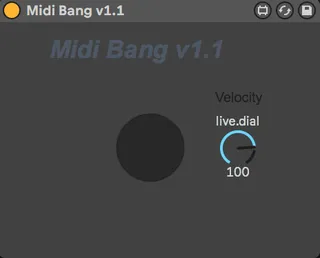
This device allows to trig midi note with audio signal in real time.
To use it :
- Put an envelope follower (audio device) on the audio track you want to use to trig the midi
- Put the Midi Bang device on midi track and map the envelope follower to his button.
- On the midi track, put the sample you want to be trigged (sampler, drum rack etc)
Good to know :
- The note generated by the Midi Bang is C3
- There is a velocity pot so you can control the velocity of the generated note.
- The threshold of the trig is 50 (the maximum is 100), you can adjust it on the envelope follower.
- If you want to reduce the latency between the audio signal and the triggered midi note you have to put the Ableton audio buffer at the minimum
Enjoy !
(If you have some questions, let me know with a comment)
Comments (5)
But i can't get it to trigger the sampler/drumrack on the midi track. the velocity bar i reacting to the contact mic i pugged into my audio track and everything but the signal goes no further than the midi-band device.
Am i right to just put the sampler/drumrack after the midibang on the same midi-channel?
Thanks!
Sorry It's been a while since I was not here !
I updated a new version of the Midi Bang, if you want to check it out, it is here : https://maxforlive.com/library/device.php?id=10384
@returecreature You have to map the button, not the velocity pot !
@Dahv, yes there is some latency... And I didn't succeed to reduce it. The only solution is : Reducing the audio buffer of ableton live
Cheers !