- Type
- MIDI Effect
- Author
- JimmyBollox
- Version
- 1.0
- License
- Commercial
- Live version
- 11.0.12
- Max version
- 8.5.0
- Downloads
- 0
- Updated
- No Updates
ArpKrafter is a MIDI Effect for Ableton Live by JimmyBollox, distributed as a commercial (paid) device. It targets Live 11.0.12 and Max 8.5.0. Published 2022-11-13. 9 user comments below.
New to Max for Live? Read what MIDI Effects do, what the Commercial license means, how to install a device.
Description
Video: https://youtu.be/yEYWbfd21_g
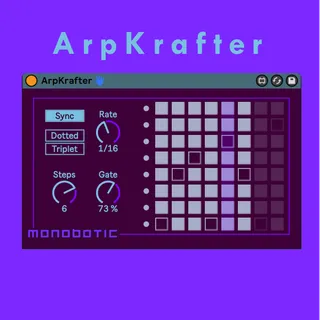
ArpKrafter is similar to Live's arpeggiator device but with customisable style patterns. This device allows for the input of chords with up to 8 midi notes. The notes are arpeggiated according to the steps of the grid pattern.
The number of grid steps and note length are adjustable. Notes can be straight, dotted or triplets and are quantized with the sync note rate or free time setting.
Comments (9)
I'm really enjoying this, and emailed some feature suggestions!
What I ended up doing was adding one live.dial for each step which when changed will bang into a pak object and then that's patched to the live.grid
I have a custom modified version of this but because it's a commercial patch, so I won't upload it anywhere but if you want you can email me and ill send you the modification piece - sans the rest of the patch
Hope that helps
I appreciate you taking the time to post that tutorial. I'll definitely give it a go.