- Type
- MIDI Effect
- Author
- B4F
- Version
- 2.1
- License
- None
- Live version
- 12.4
- Max version
- 9.1.4
- Downloads
- 715
- Updated
- 2026-05-13
Looper Pedal is a MIDI Effect for Ableton Live by B4F, distributed as freeware, with no license specified by the author. It targets Live 12.4 and Max 9.1.4. On maxforlive.com it has 715 downloads. First published 2023-06-23, last updated 2026-05-13. 7 user comments below.
New to Max for Live? Read what MIDI Effects do, how device licenses work, how to install a device.
Description
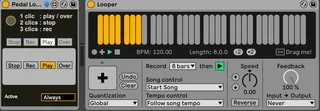
An alternative to the looper pedal switch that can be mapped and activated only when the track is armed or selected.
I had made a version previously but there were problems: I rewrote everything Control the last looper of the track.
Unfortunately does not work to record a loop without defined size (record x bars) under penalty of having synchronization problems.
I did it to control all my loopers with the same physical pedal.
Comments (7)
Can you please explain how this thing works?
How to Use:
Just put the device in the effects chain: It will control the last looper in the effects chain (if you put several). The principle is to map the device button with an external controller. The controller will only be active if the track is armed or selected. It's less good than mapping the "pedal" button of the looper but it allows you to have a single controller for different loopers which is not possible by mapping the "pedal" button (unless you want all the loopers to do exactly the same actions at the same time)
The only goal is to control several loopers on several tracks with the same controller and to be able to choose which looper will be assigned to each signal from the controller (a switch pedal in my case).
I'm looking for a device that does the same thing - allow me to use the same midi foot pedal on different track only when they are record enabled.
I've tried using this in live 12 and it doesn't seem to work - do you know if it's compatible with live 12.3.2?
It only allows me to midi map to the overdub control or the "circle" control which seems to somewhat randomly cycle between states.
Also it looks like you can only midi map the individual control (i.e record, overdub) and not to the pedal control - is that right?
Thanks again for your support.
: )
There was a minor issue when loading the looper after the device on line 12, which I quickly fixed tonight (V2.1 is available to download – I will review the device again when I have more time to correct a few more details).
The only button that should be mapped is the round button at the top left of my device. The idea was to simulate the "magic" button of the looper, which cannot be controlled by automations or Max, preventing you from using the looper as you wish ( and as I wanted to do )
If you have a MIDI pedalboard with several switches, it is possible to set something up by individually mapping the looper's buttons (rec, overdub, play, stop) from a Max Device that only activates when you arm the track, but it takes time to map.