WiFi-MIDI Sniffer
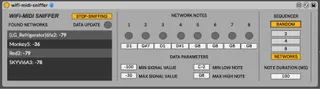
A M4L device which sonifies scanned WiFi RSSI values. The RS...
- Type
- MIDI Effect
- Author
- lozcliffe
- Version
- 1.0
- License
- AttributionNonCommercialShareAlike
- Live version
- 11.3.11
- Max version
- 8.5.4
- Downloads
- 177
- Updated
- 2023-09-26
WiFi-MIDI Sniffer is a MIDI Effect for Ableton Live by lozcliffe, distributed as Creative Commons Attribution-NonCommercial-ShareAlike. It targets Live 11.3.11 and Max 8.5.4. On maxforlive.com it has 177 downloads. First published 2023-09-25, last updated 2023-09-26. 10 user comments below.
New to Max for Live? Read what MIDI Effects do, what the AttributionNonCommercialShareAlike license means, how to install a device.
Description
A M4L device which sonifies scanned WiFi RSSI values. The RSSI values of the scanned and collected wifi networks are mapped to MIDI note values and played through a basic sequencer with various controls. Tempo can be controlled through the main transport and the MIDI note values fluctuate as new RSSI values for the scanned wi-fi networks are returned by the system query. The device uses the Max shell external to execute the shell airport scan command in macOS only. The device enables the generation of evolving musical output from ambient wifi data.
Video demo here: https://vimeo.com/867980974
Instructions (this is currently for MacOS only I'm afraid):
1. Add the device to a MIDI track
2. Press 'Start Sniffing'
3. Wait for any found networks to start showing up - this can take a minute or so (wifi will need to be turned on)
4. Press play in Ableton's main transport
5. Send the MIDI output from the track with WiFi-MIDI Sniffer on to another track with a MIDI instrument, or do something else with it...
Please feedback via comments below.
Comments (10)
Youtube video?
I've updated the instructions and added a link to a quick demo video: https://vimeo.com/867980974
sudo ln -s /System/Library/PrivateFrameworks/Apple80211.framework/Versions/Current/Resources/airport /usr/local/bin/airport
Maybe try running an airport scan directly from your terminal: https://osxdaily.com/2007/01/18/airport-the-little-known-command-line-wireless-utility/