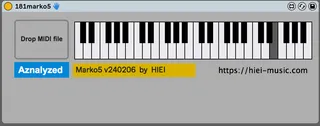
181-MARKO5 automatically generate a solo phrase
This device is capable of generating solo phrases from refer...
- Type
- MIDI Effect
- Author
- hiei
- Version
- 1.1
- License
- AttributionNonCommercialNoDerivatives
- Live version
- 11.0.12
- Max version
- 8.1.5
- Downloads
- 374
- Updated
- 2024-02-12
181-MARKO5 automatically generate a solo phrase is a MIDI Effect for Ableton Live by hiei, distributed as Creative Commons Attribution-NonCommercial-NoDerivatives. It targets Live 11.0.12 and Max 8.1.5. On maxforlive.com it has 374 downloads. First published 2024-02-06, last updated 2024-02-12. 22 user comments below.
New to Max for Live? Read what MIDI Effects do, what the AttributionNonCommercialNoDerivatives license means, how to install a device.
Description
This device is capable of generating solo phrases from reference MIDI data.
MARKO5 predicts the next note based on past performance data using probabilities. For example, if 'CF' is played, there is a high probability that the next note will be 'G'. It calculates these probabilities by referencing MIDI data.
Thus, it is recommended to refer to MIDI data of a certain length.
By using data from your favorite composers, you can play phrases in their style at your own timing.
1) Insert this device to MIDI track.
2) Insert instrument after this device.
3) Put reference MIDI data to this device.
(If nothing is loaded, a solo in the style of Mozart is output.)
4) Begin analyzing MIDI data and wait until 'Analyzed' is displayed.
5) Turn on the Arm button or Monitor in. (IMPORTANT!!)
6) Please play any key on your real MIDI keyboard(the keyboard in device is not for play)
at your own timing. Then, this device will automatically generate a melody similar to the MIDI it referenced.
I would be happy if you could write your feedback or report any bugs you find in the comments.
You can see how to work in the video
https://youtu.be/q0D9tRvhEck
Comments (22)
1) Did you insert some instrument after MORKO5?
2) Please check if the track's arm button is ON.
Play some notes on your MIDI keyboard, and then MORKO5 will output notes.
Looks cool - think it just requires a few further tweaks
Please play some notes on your MIDI keyboard after analyzed,
and then MORKO5 will output notes.
Could you try it?
Indeed, it seems there is a bug under certain conditions.
Please wait a little while I fix it.
Not functioning.
Yes, if the reference MIDI data contains avoid notes or grace notes, for example in Jazz style, it influences the notes produced by MARCO5.
Therefore, using a scale midi device after MARCO5 is an excellent idea!
Is it possible that the MIDI data contains long rests? If so, please place the MIDI data on the arrangement window, trim and crop the data, and then export that MIDI clip.
For example, if 'CF' is played, there is a high probability that the next note will be 'G'.
It calculates these probabilities by referencing MIDI data.
By using data from your favorite composers, you can play phrases in their style at your own timing.
thank you for the message.
If you did everything as I said and it still doesn't work, maybe your MIDI file contains long breaks? .
Check this out.