a better search for max devices
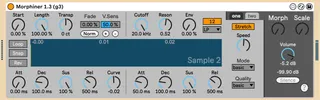
Morphiner G screenshot

Morphiner G

by GarrettNorvell

This is a mod on Opticon93's clever "Morphiner 1.3" ( htt...

View on maxforlive.com

Type
Instrument
Author
GarrettNorvell
Version
1.3.4
License
AttributionNonCommercialShareAlike
Live version
11.3
Max version
8.5.6
Downloads
431
Updated
2024-02-17

Description

This is a mod on Opticon93's clever "Morphiner 1.3" ( https://maxforlive.com/library/device/9345/morphiner ) The external will now work with MacOS and the UI now fits within Live's chain without needing a popup.

Thanks to Opticon93!

**Update 2/15/24: Envelopes & Filters fixed

**Update 2/16/24: Froze device like a proper dev

**Update 2/17/24: 1.3.4 - fixed things; added a button to clear each sample...think I remembered to lock & freeze the amxd before uploading, heheheh

Comments (29)

  • enchse · February 14 2024
    Hi! thank you for this! I love the new UI (with all due respect to Opticon93), it doesn't work for me though, maybe it's just unfrozen?
  • wakax · February 14 2024
    same here. (mac intel)
    great new interface but no sound at all :(
  • andrhodes · February 14 2024
    it doesn't work :(
  • irishmos · February 14 2024
    Samples load but midi won't trigger any sound. Looks great though!
  • GarrettNorvell · February 15 2024
    huh, weird! I'll mess with it and see if freezing helps (o:
  • GarrettNorvell · February 15 2024
    I locked and froze the .amxd, and 1.3.1 works great on my Mac; how about yours?
  • enchse · February 15 2024
    It's working, thanks!! only thing now is: Sample 2 envelopes aren't working (are they?)
  • shinytheshiny · February 15 2024
    i tried locking and freezing, still no luck for me. M1 mac, ventura 13.3
  • enchse · February 15 2024
    did you download the last version? no need to lock and freeze – he did it before sharing
  • GarrettNorvell · February 15 2024
    @Enchse: fixed! (o:
    Please let me know if anything else is broke'd
  • enchse · February 15 2024
    i think you forgot to freeze it again? :P
  • shinytheshiny · February 16 2024
    still not working for me with the update.... i tried freezing and locking again. Im running latest version of ableton. Ventura 13.3
    any ideas? would love to get this thing working. this sort of sound mangling is my absolute favorite.
  • enchse · February 16 2024
    @shinytheshiny 1.3.1 was up yesterday and was working fine (except for the envelopes).
    now 1.3.2 is not working for me too... but i can see on Max that the device hasn't been frozen.
    freezing a device works kinda like "collect all and save" and has to be done by the creator before sharing it.
  • GarrettNorvell · February 16 2024
    LOL, sorry! I'll refreeze on my end and re-upload right now
  • irishmos · February 16 2024
    I'm back to sample loading. No sound triggered from midi.
  • enchse · February 16 2024
    mmh.. 1.3.3 not working even if frozen...
    i can't help now, i'm sorry
    btw @GarrettNorvell big thanks for your time and effort!
  • GarrettNorvell · February 16 2024
    😱
    I'll take another peak
  • GarrettNorvell · February 16 2024
    woh. All sorts of stuff got disconnected within the 1.3.3 patch! It may take me some time to go back and forth with the previous version LOL but we'll get it sorted! Thanks for the thanks @enchse
  • shinytheshiny · February 16 2024
    thank you Garrett for working on this for us peasants lol! excited to run it when you sort out the wrinkles. truly appreciate all your efforts to get this thing fixed.
  • irishmos · February 17 2024
    This looks really painstakingly hard. Maybe why I've not delved into it all though it fascinates me. Perhaps, I'm better off playing with them and giving feedback.
  • GarrettNorvell · February 17 2024
    aww, thanks folks! I'm just learning this stuff by breaking it, really. Let me know if 1.3.4 works for everyone. (o:
  • enchse · February 17 2024
    It's working now! (also in Live12 beta) thank you Garrett!!
    and while we at it, if in the future something can be done for cpu usage that would be great! now is 17% just loading it with no sound playing, on a m2 pro – on Live12 is even more hungry. Big thnks again!!
  • irishmos · February 17 2024
    Triggering sound now. I noticed the morph knob seems off. It was working as a mixer before but now it's monitoring both at 12 oclock. Any increment either way, it's one sound or the other. Independent volume/level control would be a good thing as well to balance sample volume.
  • GarrettNorvell · February 17 2024
    ooooo, yeah, I don't know Max nearly well enough to reduce cpu usage, but perhaps someone else here would have a go at it?
    I will, however, take a peak at the morph knob.
  • opticon93 · March 18 2024
    @Irishmos I'm pretty sure that happens when the two samples don't have a lot of spectrum in common. For example if you lowpass the first sample and high pass the second. On the other hand, the Morphine manual is only a paragraph long and very vague.
    You all might want to look at my Polystretcher device. The Morphiner is basically two Polystretchers slapped together with the Morphine object in between. The new version has slimmed it down under the hood, so it would be much easier to just cut and paste those than trying to make sure all the connections are correct.
    Also, the polystretchers are basically "Pitch and Time Machines" created by Ableton, with a few bells and whistles from the "Building Max Devices" pack. So, I'm pretty sure its about as CPU friendly as it can get. I pretty much stick to basic/efficient modes and good quality at most. The only way to get less cpu would be to lower the polyphony. Currently, its at 5 notes for each polystretcher, for a total of ten notes, which is a lot (to me), especially with minutes of decay/release on each note.
  • opticon93 · March 18 2024
    You guys on macs are lucky. Instead of using my polystretchers, you can replace them with grainstretch~ which pretty much does the same thing (and a lot, lot more) with a much, much smaller cpu hit. The helpfile has pretty much every thing you need.
  • irishmos · March 19 2024
    where is grainstretch?
    I googled already.
  • opticon93 · March 19 2024
    Hah, yeah, sorry. it turns out grainstretch~ (the ~ is important) is no longer available. Back in the 32bit days I had it for windows and it was amazing. Then they released only a 64bit mac version and so I haven't used it since 2016.
    But it got me thinking about a few other grainers available in the Max Packages...
  • opticon93 · September 01 2025
    Check it out. Found this review online (probably an AI).
    https://lame.buanzo.org/max4live_blog/seamless-sampling-magic-unveiling-the-morphiner-g-131-for-ableton-live.html

← Back to search