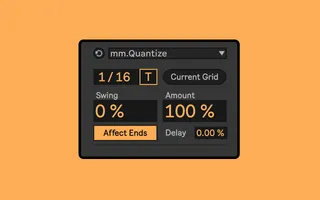
mm.Quantize - With Swing Shuffle
Tweak the swing/shuffle of a clip without having to use Live...
- Type
- MIDI Effect
- Author
- MessinkiMusic
- Version
- 1.1.1
- License
- Commercial
- Live version
- 12
- Max version
- 8.1.5
- Downloads
- 0
- Updated
- 2024-03-21
mm.Quantize - With Swing Shuffle is a MIDI Effect for Ableton Live by MessinkiMusic, distributed as a commercial (paid) device. It targets Live 12 and Max 8.1.5. First published 2024-03-05, last updated 2024-03-21. 7 user comments below.
New to Max for Live? Read what MIDI Effects do, what the Commercial license means, how to install a device.
Description
Tweak the swing/shuffle of a clip without having to use Live's groove pool. Works in realtime so you can get the right feel when adding character to your MIDI.
Any questions and suggestions, please email me at [email protected]!
FEATURES
All the functionality of the built in quantizer
'Swing' slider that shifts every second interval forward or back
'Delay' slider to nudge all selected notes forward or back, to change the feel
Filter the current selection of notes down to just the on-beat or off-beat notes
UPDATES
21/03/2024 Version 1.1.1
Fixed a bug that occurred when using the select 'On-Beat' and 'Off-Beat' buttons while 'Swing' was set to something other than 50%.
13/03/2024 Version 1.1
Fixed bug where unselected notes placed directly after a selected note would occasionally disappear.
Introduced a new feature that allows filtering of selected notes based on whether they are on-beat or off-beat.
Changed the range of the 'Swing' parameter to be in line with Roger Linn's MPC Swing format.
No swing is 50% (means 50/50, or 1:1 between first and second notes.)
Full triplet swing is 66.7% (means 66.7/33.3, or 2:1 between first and second notes.)
Some juicy values for 'Swing' are:
57.14% (4:3)
60% (3:2)
05/03/2024 Version 1.0
Initial version
Comments (7)
Is there anyway you can stop the device from zooming out when you make an adjustment? Its nice to be able to see exactly where the notes are hitting on the grid but it zooms out to the full clip when making adjustments. from what i can see, the ableton native devices (ie. quantize) don´t have the same behaviour.
I'm interested in your device, but before i buy, i have a question:
Say i have a 16th note offbeat that's swung to 25%.
If i click on it, will your device show 25%?
Or will it just show some other value (like maybe the last value it was set to)?
So i'm basically asking: does your device "read" the swing of a note and display that?
I hope so, because i tried a few swing devices, and none of them do that!