Knobbler431
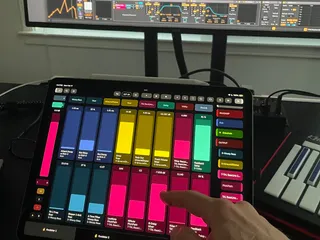
Knobbler4 turns your iPad into an auto-labeling, auto-colori...
- Type
- MIDI Effect
- Author
- zsteinkamp
- License
- AttributionNonCommercialShareAlike
- Live version
- 12
- Max version
- 8.6
- Downloads
- 0
- Updated
- 2025-03-15
Knobbler431 is a MIDI Effect for Ableton Live by zsteinkamp, distributed as Creative Commons Attribution-NonCommercial-ShareAlike. It targets Live 12 and Max 8.6. First published 2024-09-09, last updated 2025-03-15. 6 user comments below.
New to Max for Live? Read what MIDI Effects do, what the AttributionNonCommercialShareAlike license means, how to install a device.
Description
Knobbler4 turns your iPad into an auto-labeling, auto-coloring, multitouch parameter control surface for your iPad and Ableton Live. Android version in Beta -- email me at [email protected] if you would like to be a tester!
Map parameters to unmapped sliders on the iPad with a single touch. No need to enter and exit a mapping mode.
Parameter mapping configuration is saved with your Live Set, so you can switch between songs with minimal friction. Track, device, and parameter names are kept synchronized with your Live Set as you change them, even track colors!
Access every parameter in the currently selected device via the "Bluhand" tab. Bring new efficiency to your workflow.
Parameter sliders and values are updated in real time, with the same units (e.g. dB, ms, %) displayed as what you see in Live.
Navigate your Live Set faster than ever with instant touch navigation through your groups, tracks, racks, chains, and devices.
Provides a channel strip for the currently selected track to adjust volume, pan, mute, solo, record arm, sends, and the crossfader.
More here: https://plugins.steinkamp.us/m4l-Knobbler4
I have many more free Max For Live devices of all kinds. Check them out here: https://plugins.steinkamp.us/
Comments (6)
+1 for XY, maybe the X/Y lock buttons could serve the purpose of mapping triggers too?