- Type
- MIDI Transformation
- Author
- opticon93
- Version
- 2.0
- License
- AttributionNonCommercialShareAlike
- Live version
- 11.3.42
- Max version
- 8.5.3
- Downloads
- 350
- Updated
- 2025-10-24
Step.Live-er is a MIDI Transformation for Ableton Live by opticon93, distributed as Creative Commons Attribution-NonCommercial-ShareAlike. It targets Live 11.3.42 and Max 8.5.3. On maxforlive.com it has 350 downloads. First published 2025-08-30, last updated 2025-10-24. 8 user comments below.
New to Max for Live? Read what MIDI Transformations do, what the AttributionNonCommercialShareAlike license means, how to install a device.
Description
Hi,
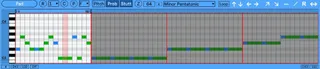
This is a one key driven step sequencer. Each incoming midi note (from a clip or keyboard) advances the steps. Notes can be as fast or as slow as you want, as long or as short as you want and as off-beat as you want.
If you want the track to be in the key of C, then just play the C key in whatever octave you want for that track.
Basically, the key, velocity, octave, timing and duration are stored in the clip (or your playing), while this device manipulates the individual Pitches, Probabilities and Stutters (16n-64n) .
It has
10 Patterns
Each of up to 64 steps
Forward, Backward, For-Back direction
Copy, Paste (within and between sequences) and Zoom
Automatable Reset
The " - " sets all the notes to C3, or all the Probs to Max, or all the Stutts to Off, depending on which view you are in.
The " / " linearly lays out the pitches starting from C1 until the end of the loop. Its useful for drum racks which usually start at C1.
To Copy, move the loop ruler to where you want it and press C. Move the loop ruler on this or another sequence and press P to paste.
Share and Enjoy
Upgrade: I've completely replaced the essential internal components with their bionic counterparts. I'll attempt to fix incompatibilities as I discover them. Please let me know.
Comments (8)
The problem is, when there are so many ways to do something, they can have unintended interaction affects.
Is this the best way? Should it be a specific note (which can no longer be used as a pitch) or a dedicated, automatable button? Or should it restart every time a new clip is started? Or every time a clip is looped? Should it be optional for it to restart at all under any of these circumstances? So many possibilities and so many ways to introduce bugs. So many ways that make sense and so many others that don't make sense after you think about them for a long, long time.
I kind of need a solid, soundly reasoned path to commit to.
I went ahead with the easiest solution of an automatable Reset button. Its the new circle R to the left. I also rearranged the layout, probably for the worse. I've been staring at it so long it all looks the same.
Enjoy
I believe I took care of the copy/paste jiggling issue.
Let me know.
lots of fun -
one question - is there a specific reason why is monophonic?
can you make a polyphonic version that can also play chords
or whatever is in the grid...?!
thank you!
Well, there were many, many reasons. But I think I finally found the secret. For a long time (the past two months straight), every modification of this patch to make it poly caused hung notes or unwanted microsecond notes or the key would be off or the mute switches would cause it to go out of sync or the pitch sequence would be a step off from the probability sequence or the entire output sequence would be a step late and on and on .... Fixing one part would break another. Not to mention getting the scales implemented correctly.
My music theory isn't great, but I believe everything checks out. You can make your own scales and it will output any of the chord notes Root, 3rd, 5th, ... 13th. Each note can be shifted up or down 2 octaves and each note has adjustable velocity.
Please let me know if something doesn't work.
https://maxforlive.com/library/device/13791/chord-stepper