- Type
- Instrument
- Author
- LucaFenn
- Version
- 1.0
- License
- None
- Live version
- 12.0.5
- Max version
- 8.6.2
- Downloads
- 450
- Updated
- 2026-03-21
SCLK Mona is an Instrument for Ableton Live by LucaFenn, distributed as freeware, with no license specified by the author. It targets Live 12.0.5 and Max 8.6.2. On maxforlive.com it has 450 downloads. Published 2026-03-21. 4 user comments below.
New to Max for Live? Read what Instruments do, how device licenses work, how to install a device.
Description
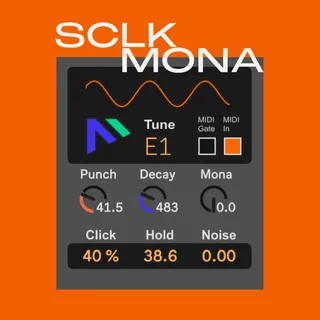
The Kickdrum You were looking for, simple and powerful!
Mona: Makes that sinewave towards Square.
Tune: A master control to shift the overall frequency so the kick matches the musical key of your song.
Punch: This adds a quick pitch-drop at the very start. It creates that "thud" feeling.
Click: Controls the volume of the sharp "click" of the first ms.
Decay: It controls how long the drum rings out. Turn it down for a short "staccato" kick, turn it up for a long, "booming" 808 bass.
Hold: This keeps the volume at 100% relative with the attack amplitude for a few milliseconds before the Decay starts. It makes the kick feel "fatter" and more consistent.
Noise: This blends in a bit of "hiss" (pink noise). It makes the kick sound more textured and "airy" instead of just a clean electronic beep.
MIDI In (Toggle): When ON, the kick will change pitch based on which keyboard key you press. When OFF, it stays at one fixed pitch no matter what key you hit.
MIDI Gate: This tells the device whether to stop the sound immediately when you let go of the key, or let the "Decay" finish naturally (also helpful for digital clicks on long kickdrums).
Comments (4)
Thank you for your feedback.
Have you tried to disengage the MIDI In button?
If not please let me know in more detail for your problem.
Luca
Hold keeps the amplitude of the kickdrum longer if you are not into snappy kickdrums.
About the noise I will consider it.
I always prefer to cut at 10khz smoothly with 24 or 12 db slope. So it depends on the sound you want to create.
Noise also works for toms or plucky melodic sounds making it cut thru a mix.
Luca