- Type
- Instrument
- Author
- Supertramp162
- Version
- 1.0
- License
- None
- Live version
- 12.0.5
- Max version
- 8.6.2
- Downloads
- 432
- Updated
- 2026-03-24
Filament is an Instrument for Ableton Live by Supertramp162, distributed as freeware, with no license specified by the author. It targets Live 12.0.5 and Max 8.6.2. On maxforlive.com it has 432 downloads. First published 2026-03-23, last updated 2026-03-24. 4 user comments below.
New to Max for Live? Read what Instruments do, how device licenses work, how to install a device.
Description
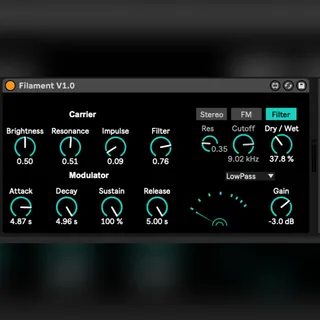
Filament — Polyphonic Karplus–Strong based instrument
Filament is a polyphonic Max for Live instrument built around the Karplus–Strong algorithm, designed for creating plucked, resonant, and evolving tonal textures.
At its core, Filament generates string-like and percussive tones shaped by dampening and brightness controls. The instrument operates across a range of just over three octaves, where it maintains stable and musical pitch behaviour before naturally drifting into more unstable, experimental territory.
A dedicated modulation envelope drives a secondary resonant filter, allowing for dynamic tonal shaping that responds to each note. This, combined with frequency modulation (FM) with adjustable depth, introduces harmonic complexity and controlled instability — pushing the sound from clean plucks into more ethereal, shifting textures.
Filament also features a stereo movement section, designed to introduce width, drift, and spatial motion. Rather than static panning, this creates a sense of evolving placement within the stereo field, contributing to a more immersive and organic sound.
Each processing stage includes its own wet/dry control, enabling precise blending between the raw Karplus–Strong signal and the processed output. This allows Filament to move between defined, percussive tones and diffuse, atmospheric soundscapes.
🔗 Find me here
Instagram: @supertramp162
Max for Live devices: https://www.maxforlive.com/profile/user/Supertramp162
KVR Audio: https://www.kvraudio.com/developer/supertramp162
Youtube: https://www.youtube.com/@Supertramp162
Comments (4)