Rotating Clock Divider
The Rotating Clock Divider is a type of MIDI sequencer which...
- Type
- MIDI Effect
- Author
- hdouble
- Version
- 1.2
- License
- AttributionNonCommercialShareAlike
- Live version
- 8.3
- Max version
- 5.1.9
- Downloads
- 3,027
- Updated
- 2013-08-31
Rotating Clock Divider is a MIDI Effect for Ableton Live by hdouble, distributed as Creative Commons Attribution-NonCommercial-ShareAlike. It targets Live 8.3 and Max 5.1.9. On maxforlive.com it has 3,027 downloads. First published 2013-03-02, last updated 2013-08-31. 7 user comments below.
New to Max for Live? Read what MIDI Effects do, what the AttributionNonCommercialShareAlike license means, how to install a device.
Description
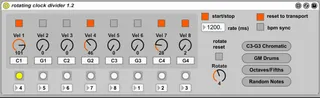
The Rotating Clock Divider is a type of MIDI sequencer which takes a clock/metronome rate and outputs pulses at different subdivisions ( rate/2, rate/3, rate/4, etc.), for easily creating complex polyrhythms and textured "modular" sounding sequences. It is based on the 4ms RCD Eurorack module.
version 1.2: added the ability to tune the pitch of individual steps, and a few pitch presets. UI overhaul.
version 1.1: added "sync to BPM" toggle. Clock rate is stored properly with saved projects. It is now possible to automate clock rate. Minor UI cleanup.
=========================
Rotating Clock Divider
Max For Live MIDI Effect v1.1
by Bunny Blake (h_double)
http://discolingua.com
@discolingua
this effect uses code from Michael Hetrick's Euromax for Max/MSP
http://mhetrick.github.com/Software/euromax/
Thanks to Icaro Ferre, whose mod of this device (http://www.maxforlive.com/library/device/1801/rotating-clock-divider-icaro-ferre-mod) suggested some improvements and cleanup I have folded back into my version.
========================================================
HOW TO USE
The Rotating Clock Divider (henceforth RCD) takes a clock rate
of n milliseconds. It transmits that rate to 8 outputs, each of which
trigger a MIDI note at a rate that is some division of the main clock
rate (n/1, n/2, n/3... n/8) This allows a large variety of polyrhythms
to be dialed in, either free-running or synced to the Ableton Live
transport.
It is ideal for generating complex rhythmic textures and
"floaty modular synth bloop"-style sounds.
The outputs can be tuned to different pitches, with a few presets:
"C3-G3 Chromatic": MIDI notes 60-67. This works well plugged into Live's "Scale" MIDI effect.
"GM Drums": kick/snare/hats/etc. Use this to drive a Drum Rack preset or other beat box.
"Octaves/Fifths": stacked octaves & fifths (C & G in 4 octaves). Good starting point if you want a bunch of notes which will sound harmonious with each other.
"Random Notes": mash repeatedly until you arrive at some interesting chaos.
The RCD effect is designed to be used in a few different ways:
1. It can drive a synth directly, using the Live "Pitch" and "Scale"
MIDI effects to tune it to a musically useful range. A synth patch
with velocity sensitivity and a fairly quick attack/decay is generally
best.
2. It can be used to trigger samples in a Drum Rack (or other drum
sampler or beatbox). Use the "GM Drums" mode for best results.
3. The RCD can be used to drive an Instrument Rack with 8 chains, each
chain filtered to a single MIDI note. This way, each RCD output pulse
can drive a separate synth/effects chain, for maximum modular-style
madness.
========================================================
CONTROLS
START/STOP: The RCD will automatically start/stop in sync with the
Live transport, it can also be started manually in free run mode with
no transport running (or stopped without interrupting the Live
transport).
RATE: Set the main clock rate in milliseconds, the time between pulses
at the longest division.
RESET TO TRANSPORT: When engaged, the clock will reset with every bar
of the Live transport, to make it easier to sync to other tracks in a
song.
BPM SYNC: Locks the RCD's clock rate to Live's master tempo.
TOGGLE BUTTONS: Allows each of the 8 output stages to be armed/muted.
VELOCITY DIALS: Sets the velocity for each of the 8 output stages.
PITCH CONTROLS: Sets the pitch for each output stage to any MIDI note number.
ROTATE: Shifts the divisor for each of the 8 output stages, as shown
by the indicator beneath the individual columns (e.g. incrementing
Rotate causes output 1 to divide by 2, output 2 to divide by 3, all
the way to output 8 which wraps back around and divides by 1).
ROTATE RESET: Resets the clock sync every time the Rotate control is
changed. This may cause a subtle "jump" whenever Rotate is adjusted,
but when Rotate Reset is turned off, the output pulses can drift out
of sync with one another when the stages are rotated. This could be
useful weirdness, so experiment!
========================================================
KNOWN ISSUES
- Starting the Live transport automatically switches on the "reset to
transport" sync control (you can manually switch it right back
off). This is a workaround because otherwise the effect wasn't
always properly detecting the state of this switch when started.
- Proper patch save/restore is still on the TODO list, but if you save a project containing this effect, the effect state will be saved with the project.
========================================================
THANK YOU FOR YOUR INTEREST IN THIS PLUGIN
If you find it useful and would like to show your support, please take
a moment to visit my Bandcamp page and buy my album!
http://seven4seven.bandcamp.com
Comments (7)
This is a great device and I think people should try the original one and my modded version. Both have different characteristics.
On another point it might be worth setting "start/stop" and "reset to transports" parameter visibility to hidden as they fill up the undo buffer.