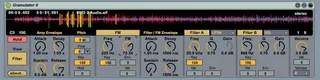
Granulator II
Granulator II is a Max4Live synthesizer based on the princip...
- Type
- MIDI Effect
- Author
- monolake
- Version
- 2.0
- License
- AttributionNonCommercial
- Live version
- 9.0.1
- Max version
- 6.1
- Downloads
- 5
- Updated
- No Updates
Granulator II is a MIDI Effect for Ableton Live by monolake, distributed as Creative Commons Attribution-NonCommercial. It targets Live 9.0.1 and Max 6.1. On maxforlive.com it has 5 downloads. Published 2013-03-11. 4 user comments below.
New to Max for Live? Read what MIDI Effects do, what the AttributionNonCommercial license means, how to install a device.
Description
Granulator II is a Max4Live synthesizer based on the principle of quasi-synchronous granular synthesis. It creates a constant stream of short crossfading sections of the source sample, and the pitch, position and volume of each grain can be modulated in many ways to create a great variety of interesting sounds. Granulator II also offers two multimode filters in series to further shape the resulting timbre. Granulator II is the latest incarnation of a series of granular based synthesizers I wrote for my own usage since the additon of real time audio processing to Max in 1997.
Comments (4)
Am I just using it wrong? Every single preset did this. I turn the output volume all the way down, and my limiter has the lowest possible ceiling. I understand how granular synthesis works in theory. When I'm just looking at the device visually, no audio, I feel pretty comfortable with the controls.
I feel like I should be getting nice gentle grain sweeps through my audio file. But instead, I always get these harsh clipped square wave digital sounds.
Is something messed up? Was there a max update that broke this device? Or am I just overestimating my understanding of what's going on? I'll say it again, every single preset included in the pack needed a limiter, or else my output becomes positive infinity.
RESTART YOUR COMPUTER IF YOU EXPERIENCED WHAT I DESCRIBED ABOVE.
okay, dunno what happened. I got so frustrated that I stubbornly opened up the device after a shut down, expecting it to work.
Well it did. No more horrible cacophony and no need for a limiter. It behaves exactly as I would expect it to.
Another strange difference is that the 'mini-waveform' displayed above the LFO is now working correctly. Before, it seems like it only displayed the first half of the waveform. Eg, if I selected a "Tri" LFO, it displayed in the viewer like a rising ramp. Now it shows the full waveform.
There's likely some initialization/installation bug. If I remember correctly, I think I got an error or warning (in a Max console that popped up) when I first opened the device.
TLDR: If experiencing issues upon first loading Granulator II, RESTART. Dunno which did the trick, but try closing and opening Ableton, and if no dice, then your computer.
Can't wait to get started, seems like the most featured granular M4L I've come across so far! And IT'S FREE! (I'll make a small donation if I find myself using it often). Thank you Robert for this amazing device!