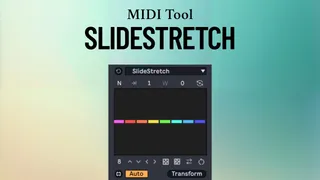
SlideStretch
SlideStretch is a Max for Live MIDI transformation tool that...
- Type
- MIDI Transformation
- Author
- carlosbtlr
- Version
- 1.0
- License
- Commercial
- Live version
- 12.3
- Max version
- 9.0.7
- Downloads
- 0
- Updated
- 2026-04-22
SlideStretch is a MIDI Transformation for Ableton Live by carlosbtlr, distributed as a commercial (paid) device. It targets Live 12.3 and Max 9.0.7. First published 2026-03-31, last updated 2026-04-22.
New to Max for Live? Read what MIDI Transformations do, what the Commercial license means, how to install a device.
Description
SlideStretch is a Max for Live MIDI transformation tool that allows you to manipulate the rhythm and groove of your MIDI tracks in a very fast and intuitive way. Its multi-slider UI lets you stretch and contract notes and chords while maintaining the relative position of the rest of the sequence, allowing you to take total control of your MIDI and create infinite rhythmic variations from a single starting point.
Step Sliders
Make rhythmic variations on your selected MIDI notes with the UI step sliders. The step sliders can be dragged vertically and horizontally to produce complex transformations using broad, long scope gestures. The shift key can be used for finer adjustments.
Note/Grid Modes
Switch between transforming notes or chords individually or in groups defined by Live's grid interval. Use this to make each slider target individual notes or grid defined groups. (Make sure to turn adaptive grid off in Live's MIDI clip settings when working in grid mode)
Clamped Mode
Clamped mode will prevent notes from shifting beyond the selection time, making the selected notes always fit within the selection time. Use this to restrict your transformations to a specific time span.
Custom Groups
Dial in the number of consecutive notes, chords or grid groups that you want to transform together. Use this to make transformations to arbitrary groups of notes, chords or grid groups with a single slider.
Transformation Offset
The transformation offset will shift the transformation back and forth in time, and it works with single notes as well as with groups. Use this to shift transformations across entire selections of notes.
Sliders Flip
Flip the polarity of each slider to obtain a mirror variant of the original transformation. Use this to create negative versions of your transformations.
Wrapping Mode
In wrapping mode, transformations will wrap across the selected notes when the number of notes is bigger than the number of sliders. Use this to make the transformation ripple across your entire selection of notes.
Gap Mode
In gap mode, the notes are stretched and contracted without changing their duration, leaving gaps between them instead of preserving their distance. Use this to leave gaps between the notes for a more staccato feel.
UI Controls
Make even more variations with the number of sliders, global shifting, global rotation, randomization, scrambling, and reverse. Use these controls to try out new rhythmic variations.
Minimum Requirements:
- Ableton Live 12
- Max 9