- Type
- Audio Effect
- Author
- pechmann
- Version
- 401.0
- License
- AttributionNonCommercialShareAlike
- Live version
- 9.0.1
- Max version
- 6.1
- Downloads
- 1,063
- Updated
- No Updates
AS is an Audio Effect for Ableton Live by pechmann, distributed as Creative Commons Attribution-NonCommercial-ShareAlike. It targets Live 9.0.1 and Max 6.1. On maxforlive.com it has 1,063 downloads. Published 2013-03-05. 2 user comments below.
New to Max for Live? Read what Audio Effects do, what the AttributionNonCommercialShareAlike license means, how to install a device.
Description
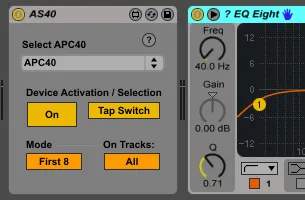
Lets you activate and select devices using the APC40's mute and solo buttons. Automatically control eight devices per track or use markers to expose them to the APC individually.
Live 8 version here: http://www.maxforlive.com/library/device/1296/as40
Start by selecting an APC40 device in the dropdown menu. If "Tap Switch" is turned on, the tap tempo button will toggle between AS40's device navigation and the mute/solo buttons' standard behaviour. Device navigation works as follows: For up to eight devices on a track, a mute/solo button pair will light up (or just the solo button if the respective device is deactivated). Pressing the mute button will toggle activation states for the respective device, and pressing the solo button will select, i.e. "blue hand" it, so you can very quickly control eight devices per track.
Quick "first eight" mode:
On tracks with few devices, you might wish to have all devices quickly map to the APC. In this case, use "First 8" mode, where the first eight devices found will be controlled by the APC automatically. Across the track, devices will be mapped according to their respective paths, so that a device is mapped to a button pair farther to the right if it appears later in the same chain, then on a chain farther down in the rack, then on a later rack, etc. If the track contains more than eight devices though, it may be a little hard to predict which devices will actually be mapped.
Marking devices and tracks:
For manual control over which devices will be sent to the APC, use "Marked" mode. To have a device map to a mute/solo button pair, add a "?" to the first three characters of the device name, as in "? Auto Filter".
Switching from "All" to "Marked" on the "On tracks:" toggle, you can mark tracks in the same way, adding a "!" to the first four characters. This will tell the AS40 to use the specified mode on this track, but to use the other mode for all unmarked tracks.
Comments (2)
Any chance of a version that doesn't have the device on/off selection on the mutes? I don't trust my dumb fingers not to whack those now and then.
Thanks for the device.