- Type
- Audio Effect
- Author
- pechmann
- Version
- 1.0
- License
- AttributionNonCommercialShareAlike
- Live version
- 9.0.1
- Max version
- 6.1
- Downloads
- 22,008
- Updated
- No Updates
Skin Editor is an Audio Effect for Ableton Live by pechmann, distributed as Creative Commons Attribution-NonCommercial-ShareAlike. It targets Live 9.0.1 and Max 6.1. On maxforlive.com it has 22,008 downloads. Published 2013-03-07. 14 user comments below.
New to Max for Live? Read what Audio Effects do, what the AttributionNonCommercialShareAlike license means, how to install a device.
Description
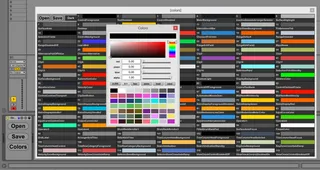
A skin editor for Live 9. Obviously not as practical as the well-known Live 8 editor, but at least you can edit all colors. Also, you can only really open skin files that were created with this skin editor (and the default skin). To save the current set of colors as a skin, click 'Save', navigate to Live's skin directory ([Live installation directory]\Resources\Skins) and enter a file name with the '.ask' extension.
Comments (14)
http://www.macableton.com/Ableton_live_tutorials/project-organisation/live-9-skin-editing.html
Maybe this is obvious to some, but I could never get transparency to work in Live's colour picker before, but I finally managed it today using this editor, so I've written up that as well.
I also sussed out how to increase the contrast in the Note Editor and Arrange Views, which is a great feature in Live 9, but is just too feint.
It's working great by the, much easier and quicker than the old one I find
Thanks
Here's my skin so far
http://www.mediafire.com/download/dls7sdu7l1j3v3j/Untitled1.ask