- Type
- Audio Effect
- Author
- dessicant
- Version
- 1.0.2
- License
- AttributionShareAlike
- Live version
- 9.0.6
- Max version
- 6.1.3
- Downloads
- 3,120
- Updated
- 2014-04-17
Dmixer is an Audio Effect for Ableton Live by dessicant, distributed as Creative Commons Attribution-ShareAlike. It targets Live 9.0.6 and Max 6.1.3. On maxforlive.com it has 3,120 downloads. First published 2013-10-20, last updated 2014-04-17. 10 user comments below.
New to Max for Live? Read what Audio Effects do, what the AttributionShareAlike license means, how to install a device.
Description
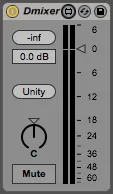
Utility device which recreates the mixer section for a track.
Ableton's utility is great for automating volume and panning, but it only goes to -35db. Often, the sound is still audible at this level. Audio effect racks can work around this, but the user interface makes it feel like a workaround, not a feature. By using Live's own gain slider, we can go to -70db, mute and pan while leaving the mixer section free to MIX, independent of automation curves.
Includes:
* Peak metering
* Gain as a slider and numeric value
* Unity gain button to quickly reset to 0.0db
* Stereo panning
* Mute button
Comments (10)
omg I *hate* the utility device for just that very reason.
Can I hug you over the internet? I mean, this is such a solid piece of patch.
I like using the live.gain~ to do the monitoring, and the patch is clean clean.
...There's a residual live.gain~ in there, though, it seems like we can just remove it.
Any way; thanks :)
Thanks! Good catch-- I was doing some A/Bing of the signal pre- and post-pan, and forgot to take it out. Updated!
If you put an instance of your plugin on the track there's only the left audio played. After moving the pan knob the problem is gone.
There seems to be a minor problem with the initial value of the right pan knob.
After the plugin is loaded you'll not see it anymore. In order to reproduce the issue you have to restart Ableton Live and put your plugin on the track.
loadbang did not work.
Also, every single fader change counts against an Undo step. So if you have automation moving a fader, good luck trying to undo everything, every single automation change, even if it's just a line, not a breakpoint, will count as an Undo step.