a better search for max devices
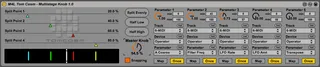
Multistage Knob screenshot

Multistage Knob

by tomcosm

Full video explanation here - http://youtu.be/TciEkxnb0bU...

View on maxforlive.com

Type
Audio Effect
Author
tomcosm
Version
1.0
License
None
Live version
9.0.6
Max version
6.1.4
Downloads
3,232
Updated
No Updates

Description

Full video explanation here - http://youtu.be/TciEkxnb0bU

This device allows you to send 5 separate parameter changes signals (with min/max) depending on where the Master Knob is, great for live performance when you want one knob to sequentially do a lot of things! http://www.cosm.co.nz

Comments (7)

  • synnack · October 23 2013
    Nice one Tom! Many people will want this. (Also, why don't you update your profile on maxforlive.com to drive more people to your site?)
  • bilaldeledakrew · October 23 2013
    hi dude, great idea once again !
    just to say i've a trouble with reset on parameter 1, the snapping function works great with the 4 others but not with this one
    so sometimes it's 0, sometimes not..
    let us know if you update this (or if it's just with my Live 9.0.4)
  • tomcosm · October 24 2013
    Yo Synnack - I updated it... however there's an issue with the twitter field, doesn't let me use an underscore (my twitter is http://www.twitter.com/tom_cosm).
    Thanks heaps for this site btw!
  • synnack · November 11 2013
    Thanks Tom. I fixed it. You can put in tom_cosm now.
  • ryanmcrobb · November 12 2013
    Hi Tom,
    Just so ya know, this device crashed Live for me, when I attempted to map the bypass switch of a VST effect(RedSkull Distortion).
    Cheers
  • betaunits · January 21 2014
    This is a great idea, Tom! It is also extremely close to something that I have been wanting to do but lack the understanding to program. Here's a suggestion for making this even more powerful: Add a check box for each mappable parameter to snap back to minimum value after the master knob passes out of its range. An example of its use would be: I want to build a 3-level nested instrument rack that is controlled by three sliders to select one of 48 different instruments. First slider selects one of four sound categories: mono-lead, poly-lead, bass, pad. Second slider selects one of three sound types: pure tone, full/harmonic-rich tone, gritty/dark/distorted tone. Third slider selects one of four instrument chains. So you have your "category rack" with four chains, each of which contains a "sound type" rack, with three chains, each of which contains an instrument rack. Do you follow so far? What I want the "return to minimum" option for is to allow me to keep all of these racks turned off unless they are selected to save CPU. If there is a smarter way to do this I am all ears! Thanks for all that you have done and continue to do for the Live community.
  • betaunits · January 21 2014
    Hee, well no way to delete comments so rest assured I figured out that all I needed to do was truly learn the way Macro knobs work with device on/off switches... *blush* I also realized that my idea above wouldn't have done what I thought. Ha!

← Back to search