- Type
- MIDI Effect
- Author
- 12RT2
- Version
- 1.2
- License
- None
- Live version
- 9.0.6
- Max version
- 6.1.4
- Downloads
- 1,209
- Updated
- 2014-11-25
Sequenscene is a MIDI Effect for Ableton Live by 12RT2, distributed as freeware, with no license specified by the author. It targets Live 9.0.6 and Max 6.1.4. On maxforlive.com it has 1,209 downloads. First published 2013-10-22, last updated 2014-11-25. 9 user comments below.
New to Max for Live? Read what MIDI Effects do, how device licenses work, how to install a device.
Description
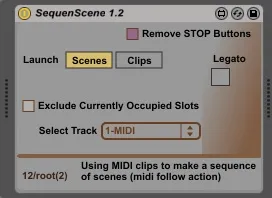
Make sequence of scenes (or clips on a specific track) using midi clips.
You can use it as the Cubase's Arranger Track function, or to make more complex Follow Action.
# Similar to using dummy clips in conjunction with MIDIOX or IAC, but saves you the trouble of irregularities, sudden crashes etc...
____________________________________
FIXED ON V1.1:
I figured out a way to make the 'Exclude' function automatic! You can now create new dummy clips, drag, delete, duplicate as freely as you like, and all on-the-fly! No clicks are needed.
Just play.
___________________________________
INSTRUCTIONS:
Put the device in a clean midi clip and remove all the STOP buttons (there's a special button for that too...) Play on the low notes. The lower the note, the higher the scene. For example: C-2 will launch the first scene. C#-2 the second, C-1 the 13th etc. You can create a midi clip that contains those notes or even record yourself in action.
/ Make sure not to include the scene which the actual clip is in. This may cause some unwanted loops and stops. // v1.1 FIXED! No need to worry about that any more!
Especially for that you get the "Exclude currently occupied slots" function, which tells the device to ignore midi notes that refer to scenes with dummy clips on them.
Furthermore, this way you can exclude scenes without the need to enter the clip itself, by putting a dummy clip on them (even an empty one). You can also move it on-the-fly if you want.
/Choose Clip launch mode to launch clips from a selected track, OR Scene Launch mode to launch the whole scene.
/ Use the legato mode to ignore successive similar notes
Tip: try adding midi effects before the device (like arpeggiator for example :)) ) to get some more of the midi advantages...
Have fun!
by Ronen Peri (12RT2)
Comments (9)
cheers!
my device is here: http://www.maxforlive.com/library/device/2027/seqscene-rv
i hope others can find it useful
In some irregular situations, has problem with starting after stop all clips, but not only - does not work several times and then starts again.
Don't know what the pattern could be.
Finally we can use clips as arrangement options. AWESOME!
Also I would like to add clips that triggers a scene relative to the place that it is set in. E. g. if that clip is in row 4 and I want to trigger scene 12, I would like being able to make your device count from 4 to 12 = +8. So scenes should be launched relative to where the clip is in (e. g. also -2 for example, so two scenes above the clip should be launched next). Could you realise this with your device?