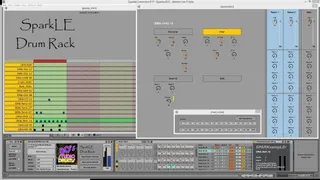
SparkLE Drumrack170
This device uses the Arturia SparkLE MIDI device to play Spa...
- Type
- MIDI Effect
- Author
- xanadu
- License
- AttributionNonCommercialNoDerivatives
- Live version
- 9.0.5
- Max version
- 6.1.3
- Downloads
- 1,108
- Updated
- 2013-12-25
SparkLE Drumrack170 is a MIDI Effect for Ableton Live by xanadu, distributed as Creative Commons Attribution-NonCommercial-NoDerivatives. It targets Live 9.0.5 and Max 6.1.3. On maxforlive.com it has 1,108 downloads. First published 2013-10-16, last updated 2013-12-25. 11 user comments below.
New to Max for Live? Read what MIDI Effects do, what the AttributionNonCommercialNoDerivatives license means, how to install a device.
Description
This device uses the Arturia SparkLE MIDI device to play SparkLE sample kits from a Live Drumrack. Display on an iPad using Mira is supported.
Release update:
- Previous versions are included in the .ZIP file.
- Ableton demo .ALS file present.
Comments (11)
The devices are frozen now and the abstractions / subpatchers themselves are present as well.
I tried installing the .jar and .maxpat into
.../Cycling '74/Max6.1/patches/user
And set my path in max to point there. The device loads, and no warnings pop up, but it doesn't seem to detect my SparkLE. So I dug up some info on jmidi.jar, and saw some outdated recommendations to install into
..../Max6.1/java/lib
But still no go. From the command line, java -version reports
"1.6.0_21" (Java SE runtime, 64-bit server)
Any ideas? I love the idea of this patcher, especially with Mira support!! Thanks for putting in the time to make this sequencer...the Arturia sequencer is a pig on CPU if I just want it to control other devices.
Program Files (x86)/Cycling '74/Max6.1/Cycling '74/java/lib
and jmidi-demo.maxpat to:
Program Files (x86)/Cycling '74/Max6.1/patches/extras
So no need to hack the max path. This seems to work.
However, the live.object doesn't return a valid object (I enabled debugging to see this, and confirm the java stuff is found in the classpath). So it doesn't look like my SparkLE is found. The MIDI port is disabled for everything in Ableton, and the Arturia VST works fine. :(
Cheers
Willem.
I've added a new version of the device. This version has a SparkLE.through.Live device that must be placed on a MIDI track of it's own. SparkLE MIDI must be enabled in Live and both input and output must be connected to the track of the new device. Monitor In must be lit.
This new device will communicate with the SparkLE.DRUM.rack using UDP channel 9980 and 9981.
Note that SparkLE MIDI must be off when connecting the controller again to the SparkLE software.
I wonder if Ableton will ever solve these midi IO issues, giving us SysEx, channels and endless encoders.
However, if I then open the Editable version, the drop-down list is all MIDI ports I've ever used on Windows. Every device ever connected (and registered in the registry), is listed. "Get SparkLE MIDI port" button doesn't seem to work. If I select SparkLE manually, all LEDs will blink once, however knobs and button hits don't show "MIDI from SparkLE" activity.
I didn't have time to debug the difference between these versions yet. I'll try to get more time with them this week.
The SparkLE.IO.003.amxd connects to the main device using the OSX/UPD network. That should be okay as well when the IO to the hardware works.
The main device can't and shouldn't connect to SparkLE MIDI because these MIDI ports are already being used by the IO device.
It also helps to have a clip selected ;)
It doesn't detect the drumrack automatically like it says, so I need a MIDI pitch shift to get it into range.
I like how it can jump from 1 8 step sequence to another in 1 button push. And it seems more responsive than the software from Arturia. Anyway...good work!