- Type
- MIDI Effect
- Author
- humanize
- Version
- 1.1
- License
- AttributionNonCommercialShareAlike
- Live version
- 9.0.6
- Max version
- 6.1.4
- Downloads
- 19,991
- Updated
- 2015-03-10
Humanizer is a MIDI Effect for Ableton Live by humanize, distributed as Creative Commons Attribution-NonCommercial-ShareAlike. It targets Live 9.0.6 and Max 6.1.4. On maxforlive.com it has 19,991 downloads. First published 2014-01-28, last updated 2015-03-10. 5 user comments below.
New to Max for Live? Read what MIDI Effects do, what the AttributionNonCommercialShareAlike license means, how to install a device.
Description
THIS DEVICE HAS BEEN SUPERSEDED BY THE GROUP HUMANIZER, WHICH CAN HUMANIZE MULTIPLE CHANNELS, KEEPING THEIR VARIATIONS CORRELATED, IN A REALISTIC MANNER. WE RECOMMEND YOU DOWNLOAD THAT ONE INSTEAD:
http://www.maxforlive.com/library/device/2466/group-humanizer
---------------------------------------------------------------
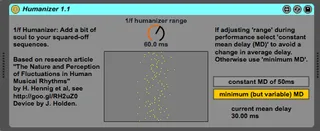
1/f Humanizer: Add a bit of soul to your squared-off sequences
Summary:
Each incoming MIDI note is delayed a random amount of time. The delays that humans produce when playing music are not purely random but are correlated and can be described by colored noise (for example 1/f noise, also called pink noise). The 1/f Humanizer thus imitates the human type of delays. Based on the research article by
Holger Hennig et al, "The Nature and Perception of Fluctuations in Human Musical Rhythms", PLoS ONE 6:e26457 (2011). Free article download at www.plosone.org/article/info%3Adoi%2F10.1371%2Fjournal.pone.0026457
Max for Live implementation free for private use, written by James Holden.
Technical description:
For each incoming MIDI note (a list composed of one pitch and one velocity), the trigger object first asks a random object (pink~) to produce a random value in response to a bang message ("b"). The random range is set by the RandDel dial. The random value is then interpreted as delay time by the pipe object.
New in Version 1.1:
- window added, that shows the delays
- new switch between two modes:
(1) "minimum (but variable) mean delay". This setting makes the humanizer respond instantly to the selected 'range'. The mean delay is half the humanizer 'range'. Note that the current mean delay changes when adjusting 'range'. Recommended as default.
(2) "constant mean delay of 50 ms". Recommended when adjusting 'range' during performance.
Comments (5)
also i made the choice to use a buffered recording of pink noise as a workaround so that when notes arrive simultaneously (ie a chord) they can be given different delay values. this was a behaviour i desired for musical reasons, rather than something that the research justified, but the slight sacrifices made in achieving it don't spoil the coherence that makes the timing errors 'human'.
i put the range-related calculations before the buffer for simplicity / because i hadn't considered your use case, but it would be trivial for you to move those objects to a point after the buffer read in the signal chain. also: to get it to behave how you want you should make it add (100 - range) to every delay value to keep the mean delay fixed as you turn the knob.