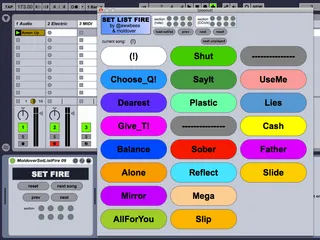
SetListFire
Please see this free section of my Ask Video - Sound Control...
- Type
- MIDI Effect
- Author
- moldover
- Version
- 1.0
- License
- None
- Live version
- 9.1
- Max version
- 6.1.0
- Downloads
- 4
- Updated
- 2023-06-08
SetListFire is a MIDI Effect for Ableton Live by moldover, distributed as freeware, with no license specified by the author. It targets Live 9.1 and Max 6.1.0. On maxforlive.com it has 4 downloads. First published 2014-01-24, last updated 2023-06-08. 9 user comments below.
New to Max for Live? Read what MIDI Effects do, how device licenses work, how to install a device.
Description
Please see this free section of my Ask Video - Sound Control course for a quick explanation of what this device is and how to use it: http://play.askvideo.com/live-301-moldover-sound-control/24
This device is helpful in organizing large Ableton sets with many scenes into "sections" and "songs". Rather than dealing directly with hundreds of individual scenes, I group them into songs with up to eight sections. The SetListFire interface creates one friendly interface, that can access all the sections of dozens of songs. Set lists are created by editing text files. This method makes it easy to try out different set lists, edit them quickly with copy/paste, and save/recall them for different kinds of shows. An example setlist is included with the download.
Note: to have a setlist automatically load with your Ableton set, you need to name your setlist "default_setlist.txt" and have it in a folder in one of your Max search paths. To add a Max search path, go into Max, go to Options->File Preferences, click the +, and add the folder where you put default_setlist.txt.
Designed by @moldover (moldover.com)
Implemented by @awwbees
Comments (9)
Please,it would be nice a short video tutorial explanation with one example to how we can use this device.
I can not use it,it seems be great
Thanks
Regards ;)
Batteries not included,
( ! )
Where is the Max I am supposed to go into? I have max for live but I don't see anything that says MAX other than a folder in the Cycling 74 folder, but this doesn't have an Option, or a file preferences, or a + for that matter.
Where is the Max I am supposed to go into? I have max for live but I don't see anything that says MAX other than a folder in the Cycling 74 folder, but this doesn't have an Option, or a file preferences, or a + for that matter.
Thanks much,
Bob
I'm trying to create a set list of about 40 songs, and have been editing the text file. After song 23, however, it no longer is displaying the song name bubbles. They are still there, apparently, because if I click in the area they should be in, they do fire, but they aren't visible. Also the window updates with the extra space, but it's just blank. Do you have any suggestions?
Have beautiful New Year 2019 ;)