- Type
- MIDI Effect
- Author
- pmonet
- Version
- 1.0.1
- License
- Attribution
- Live version
- 9.1.2
- Max version
- 6.1.7
- Downloads
- 22,361
- Updated
- 2015-05-07
Architect is a MIDI Effect for Ableton Live by pmonet, distributed as Creative Commons Attribution. It targets Live 9.1.2 and Max 6.1.7. On maxforlive.com it has 22,361 downloads. First published 2014-06-17, last updated 2015-05-07. 29 user comments below.
New to Max for Live? Read what MIDI Effects do, what the Attribution license means, how to install a device.
Description
*** UPDATE 5/7/15 ***
Work has officially begun on Architect 2.0. It is being re-written from scratch as an audio effect so you can place it on any track. Mapping parameters will be a breeze! If you have suggestions, feature requests, or any comments please contact [email protected]. Thanks for your support!
************************************************************************************
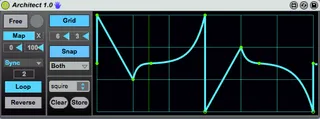
Architect is a user-friendly envelope generator made for drawing complex automation curves in Ableton Live. The envelope shape can be mapped to any parameter and is triggered by MIDI (default) or manually.
The time domain is set in terms of either seconds or sync rate. The envelope can be looped in free mode, can be triggered in reverse, and the min and max range can be flipped to invert the envelope shape.
There is a user-definable grid and curve points can be snapped to the grid. There are several preset shapes and the user can store their custom shape with the Store button.
Enjoy!
Upcoming in V2:
MIDI-sustained loop mode.
Resizable pop-out envelope shape window.
Redo Map Button implementation.
Various minor fixes.
Comments (29)
Feature requests are 100% welcome, as are bug reports.
great work, love the display because it adds vertical snap. This was missing from the display in lilmidienvelope.
@EJWycoff - Yes. Plans for a pop-out and resizable envelope shape window are in the works. Is that what you were asking?
@dna598 - I'm currently working on implementing a MIDI-sustained loop mode. For now, you can get around that by automating the trigger button.
Im having trouble with automating the trigger though. As soon as I press play the automation envelove disables itself and turns grey? this happens in both clips and arrange view. Any ideas?
A few suggestions for future updates:
Not sure if this is already possible but I cant delete nodes one ive added one. Maybe have it behave in the same way as live. one click to add a node and another click to remove it.
A little box under the map button so that you can manually select the device and parameter to automate. also this will allow us to quickly see which parameter is being automated.
Maybe an invert and phase slider.
A finally if you were feeling really crazy, then a second envelope/lfo so that we can morph between the two shapes like in NI Massive.
Thanks for your great work, I rated 5 star. Looking forward to new update!
1. To remove nodes, you must hold shift while clicking on whichever node you wish to remove. To curve lines, hold alt while adjusting the line segment you wish to curve. I'd love to make it behave just like Live but I'm not sure if that's possible with Max's native objects. Something for me to look into.
2. Yes, re-working that entire Map implementation is in the works. More complicated than I thought it would be; I'm still a bit of a noob with M4L.
3. To invert the range, simply switch the values you have assigned under the Map button. To invert the domain, use the Reverse button. Offset is definitely a feature I need to add.
4. This device was actually inspired by Massive's curve performer! Something like what you described is definitely in the pipeline, but a bit down the road.
Thanks again!
I.e. A reverb dry/wet knob that has a long range of small increments 0-20 and then a short range of fast increment from 21-100?
_ Nice_ but alas an unusable device = keeps on filling the UNDO buffer!
Noticed with 9.1.5 on OS X Mavericks, updated M4L that the mapping cannot be cleared. I have a few of these saved with a set, and their assignments are frozen into the instances of architect. Even dragging them out, turning the device i/o, will not reset the takeover mapping....
Looking forward to the new features!
J
Amazing device otherwise, don't know of any other that offers this functionality, including K-Devices' TED, etc.
There's a real need for this, I'd pay $$ for it.
Please fix! :)
Again, fantastic device. I am an LFO Tool fan and ow love this.
looking forward for v2.
it would be cool if there would also be dotted notes in the sync mode. i think now theres just triplets?
and a preset mangagement system where you can switch through presets via automation would also be cool.
really looking forward for the midi sustained loop feature and the pop up editor window.
cheers.
Looking much forward to your v2 update.
It would be convenient if you could delete nodes just by double-clicking.
Thanks
One thing I quickly noticed - dunno if this is a bug or intentional, but it messed up my workflow a bit - is that the circular trigger button seems to get stuck when mapped to a key.
When I click on it with my mouse, it instantly triggers the EG and turns off as soon as I release my mouse, ready to be retriggered. But when I map it to a key and press that key, the light stays on, and it must be manually turned off with a second key press before I can trigger the EG it again. Make sense?
So, say, if I wanted to fire it off four times in rapid succession, I actually have to press the mapped key 8 times. If this is a bug, I'd love if it could be fixed.
Thanks man, keep up the good work!
I really missed something like a flexible/custom envelope meta device which can be mapped to any parameters in Live.
ultimately I'd love if this device would be capable of doing some more things?
- Sustain Loop
- Envelope Loop
- Multiple Note-Input handling.
-> when new note is played, what should be done?
- continue envelope?
- retrigger envelope?
- continue envelope AND start new envelope and maybe mix the results?
The perfect flexible envelope (imo) can be found in Trackers like Renoise or even back in Impulse Tracker ages ago, it simply had everything one could think of: envelope loop, sustain loop, unlimited envelope points and drawing multiple note handling (Fade off, Continue, Cut, etc.). I made a short video clip to illustrate:
https://streamable.com/nv0vu
wouldn't it be great to have this as meta device for live to control any parameter based on midi note events? with sustain and envelope loops?