Bang my Twister
With DJTechTools Midi Fighter 3D You have 4 banks that are a...
- Type
- MIDI Effect
- Author
- audioutlaw
- Version
- 1.0
- License
- None
- Live version
- 9.1.2
- Max version
- 6.1.7
- Downloads
- 367
- Updated
- 2014-06-20
Bang my Twister is a MIDI Effect for Ableton Live by audioutlaw, distributed as freeware, with no license specified by the author. It targets Live 9.1.2 and Max 6.1.7. On maxforlive.com it has 367 downloads. First published 2014-06-19, last updated 2014-06-20. 2 user comments below.
New to Max for Live? Read what MIDI Effects do, how device licenses work, how to install a device.
Description
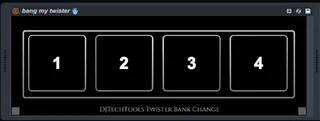
With DJTechTools Midi Fighter 3D You have 4 banks that are accessible two ways. One is through small recessed side buttons. Unfortunately I find them a bit weird to work with.
The second way to access the four banks is through Midi control. basically, Twister receives certain midi notes through a predefined midi channel and voila! You have bank change!
And thus, Bang my Twister was born. Developed by Aaron Levitz (The designer behind my Spy Guitar Visualizer) It is a simple device that sends those bank change messages to Twister. Its four buttons accept input from your first four number keys on your qwerty (without having to keymap them!). They are also midi mappable. This of course gives you two ways to change banks (three if you use the side buttons too).
Instructions: Place Bang my Twister on a midi track and send it's output to your Twister (to channel 4). Click on the buttons a few times to refresh and it should work. You can now use it with your querty numbers or Midimap. You can also use Keymap just for that extra reassurance if you would like.
Comments (2)
One note; This device has flaky controls when not key mapped but once key mapped it works flawlessly.
I have one request: I have the device in my template project and when it loads, it always switches to bank 4... Would it be easy to fix this so that it wouldn't switch the bank or would default to bank 1 instead?
Cheers!