- Type
- MIDI Effect
- Author
- scyhte
- Version
- 1.0
- License
- AttributionShareAlike
- Live version
- 9.1.2
- Max version
- 6.1.7
- Downloads
- 3,214
- Updated
- 2014-07-18
Live.Stepper is a MIDI Effect for Ableton Live by scyhte, distributed as Creative Commons Attribution-ShareAlike. It targets Live 9.1.2 and Max 6.1.7. On maxforlive.com it has 3,214 downloads. Published 2014-07-18. 12 user comments below.
New to Max for Live? Read what MIDI Effects do, what the AttributionShareAlike license means, how to install a device.
Description
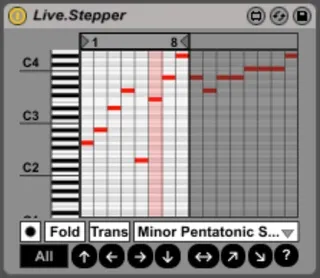
this is a simple, lightweight midi effect which steps through a sequence of up to 16 notes upon receiving a midi note, much like triggering the sequencer steps of an sh-101 with drum machine trigger signals.
it's inspired by the great "Sequential Event Generator" by MatthewJames but i wanted a smaller and simpler device, tailored to my needs. for example it takes velocity and note length from the midi input, not from the sequencer, which i find much more useful and expressive.
MANUAL:
[Record] -> notes can either be drawn in with the mouse or, when the record button on the left is active, recorded from your keyboard, a midi clip or any other midi source you route into it. when the record button is deactivated, the new loop length will be automatically set according to the number of recorded notes.
[Fold] -> the fold button acts like the fold button in abletons midiclips, only displaying the notes that are actually used.
[Trans] - with the transpose button activated, notes from the stepper will be transposed according to the notes from the midi input for even more interesting melodies.
Scale Menu - every time a note is drawn in, recorded or edited via the edit functions on the bottom the chosen scale will be applied afterwards.
[All]/[Loop] - this button determines whether all notes in the stepper are affected by the following functions or only those inside the loop range
(Up)(Left)(Right)(Down) - notes are shifted in the arrows directions
(Scramble) - scrambles the order of the sequence while keeping the notes
(Sort Up) - sorts the sequence ascending from the lowest to highest note
(Sort Down) - sorts the sequence descending from highest to lowest note
(Random) - completely randomizes the sequence inside the displayed note range
Comments (12)
Thanks for this amazing plugin.There are wonderful tools.
Is possible to record 2 Bars? the limit is 1 Bar (16 steps) ?
32 steps would be possible, but not with this version. i'd have to add it as an option and upload that new version.
i decided to go with 16 because i wanted to keep the ui as small as possible whilst maintaining best possible usability and readability. also i dont need the patterns to be longer than 16 steps. but i'll add a switch to choose between 16 and 32 steps for maximum length when i have some time. but i have yet to finish another little project.
thanks for your input. :)
32 steps would be possible, but not with this version. i'd have to add it as an option and upload that new version.
i decided to go with 16 because i wanted to keep the ui as small as possible whilst maintaining best possible usability and readability. also i dont need the patterns to be longer than 16 steps. but i'll add a switch to choose between 16 and 32 steps for maximum length when i have some time. but i have yet to finish another little project.
thanks for your input. :)
Ok,thank you ;)
Also, I was pleased to find that this device works just fine with Live 8 and Max 5.
Somewhere I saw that this was a legacy device and it was recommended that Mono.stepper was the proper replacement. Mono stepper just "Runs" and does not seem to take midi input to trigger each iteration...nothing like yours. Is yours stable in Live9?
I seem to be getting some errant polyphony (diads)but have just begun to explore it.
Thanks again!!!
:}
Message: nstep $1 output to in of Live.stepper UI
Live.number: set range(in inspector) to 1. 64.
Now searching for how to reset it to 1 on the fly....????
I've completely stolen and modified this, adding many of the features requested here (64 steps, 16 sequences, restart ...). You can find it at
https://maxforlive.com/library/device/13447/step-live-er